
How to make an AI video, in plain English
The short answer
Describe one short shot in plain words: who is in it, where, what happens in order, and how the camera moves. An AI video model turns that into a clip a few seconds long. Gemini and Grok can make one inside the chat on a paid plan; ChatGPT can't, since OpenAI closed Sora in April 2026. A video app lets you pick the model, the length, the shape and the quality, and shows the price before you generate.
What is an AI video, exactly?
An AI video is one shot, usually 4 to 15 seconds long, made by a video model from your description.
- A prompt is that description.
- A model is the AI that turns it into moving pictures. Seedance, Veo, Kling and Gemini Omni are models.
- Text-to-video starts from words alone. Image-to-video starts from a picture plus words.
A longer video, like an ad or a short film, is several shots edited together, the same way a real film is.
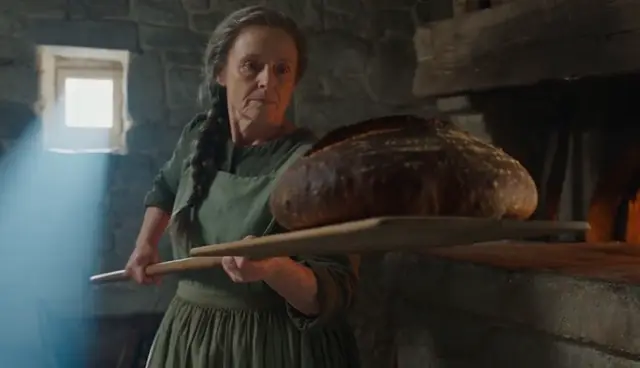
Can ChatGPT, Gemini or Grok make AI videos?
Some can. Checked on each company's own pages, November 1, 2026:
| App | Makes video? | What makes it | What you need | Clip length | Watermark |
|---|---|---|---|---|---|
| ChatGPT | No | Nothing now: OpenAI closed Sora, its video app, on April 26, 2026, and the Sora API on September 24 | — | — | — |
| Gemini | Yes | Gemini Omni 1.2 Flash. Omni replaced Veo 3.1 in the Gemini app in May 2026 | A Google AI plan, from $4.99 a month (Google AI Plus, US); age 18+ | 3–10 s with sound (up to 15 s on AI Ultra); ask what happens next to extend it | A visible mark you can switch off in settings, plus an invisible SynthID mark that stays |
| Grok | Yes | Grok Imagine | The Premium plan, $30 a month, or higher; Free and Plus have no video | 480p or 720p; 15 s at 1080p on the $100 Super plan | A visible Grok mark you aren't allowed to remove |
| Meta AI | Yes, including its Vibes feed | Not named by Meta | Free, with limits; Meta One plans from $7.99 a month give more | Not published | Not published |
| Claude | Not quite | No video model of its own. Higher-end models such as Opus 5.5 animate existing images, text and shapes into motion graphics | A paid plan: Opus 5.5 is on Pro ($20 a month) and up, not Free | Motion graphics: as long as you need | None on motion graphics |
Want it free? Google Vids and YouTube Shorts make video with the same Gemini Omni model at no cost, with usage caps. Using Gemini? Our Gemini video guide has its limits, prompts to copy and a test against Seedance.
The lesson in one line: the app is not the model, and the model behind an app can change. Gemini moved from Veo to Gemini Omni this year, and ChatGPT's video went away with Sora.
What's the difference between a chat app and a video app?
A chat app is your phone camera on auto. A video app is the same camera in pro mode: you choose the lens (the model), the length, the shape and the quality yourself.
| Chat app (Gemini, Grok…) | Video app (SpeedReel, Higgsfield, CapCut…) | |
|---|---|---|
| What you type | A request, in conversation | A prompt, plus settings |
| Who picks the model | The app: one model | You, from several (Seedance, Kling, Veo…) |
| Length | Little choice (Gemini: up to 10 s, or 15 s on AI Ultra) | You choose (Seedance 2.5: 4 to 30 s) |
| Shape | Some choice | Wide, vertical, square and more |
| Quality | Mostly fixed | You choose (480p to 1080p) |
| Your own pictures | A few (Gemini: up to 5 photos) | A start and end frame, plus many references (Seedance 2.5: up to 30 images) |
| Price | Inside your plan, from a shared usage allowance that video uses fastest | Per clip, shown before you generate (SpeedReel: 62 credits, about $0.62, for 5 s at 480p) |
| Good for | Trying it, a quick fun clip | Clips you'll post or sell: a set length, vertical video, the same character twice, many takes |
Which one should you use?
- You want to try it, or you already pay for Gemini or Grok: start there.
- You need vertical video, a set length, the same person in several clips, or lots of takes: use a video app.
- You want help writing the prompt: ask any chat app, ChatGPT included, to write it in the four parts below, then paste it into a video app. The chat app is the writer; the video app is the camera.
- You want a finished video with music and cuts: use a video app with a timeline, or edit your clips afterwards.
How do you write an AI video prompt? Four steps you can watch
Here is one scene written four times. Each version adds one kind of detail, and each clip shows what that detail changed. All four were made with Seedance 2.5: 8 seconds, 480p, with sound.
Step 1 of 4
One sentence
Just the idea.
A baker takes a loaf of bread out of a wood-fired oven at dawn.
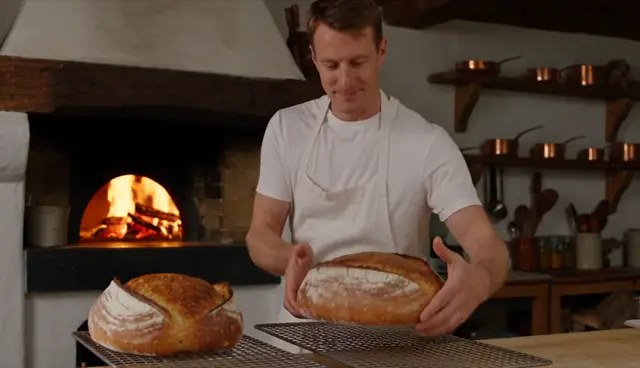
What came out: the model invented everything. It made three shots in two different places: a dome oven outdoors at sunset, a close-up of a paddle, then a young man in a white T-shirt in a modern kitchen. We never described him. Our first try at this exact prompt was refused by the copyright check; the second went through.
The lesson: whatever you don't write, the model decides.
Step 2 of 4
Who, and what happens in order
A person you could pick out of a crowd, and three timed steps.
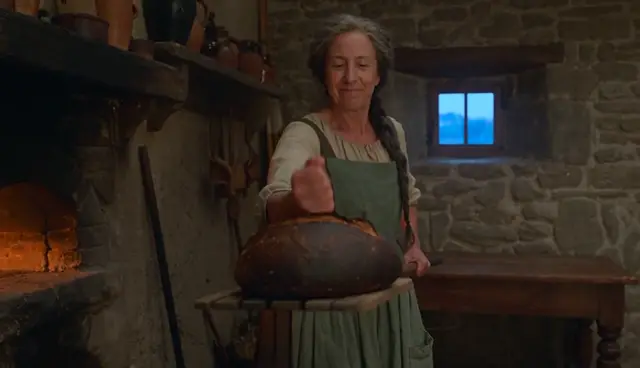
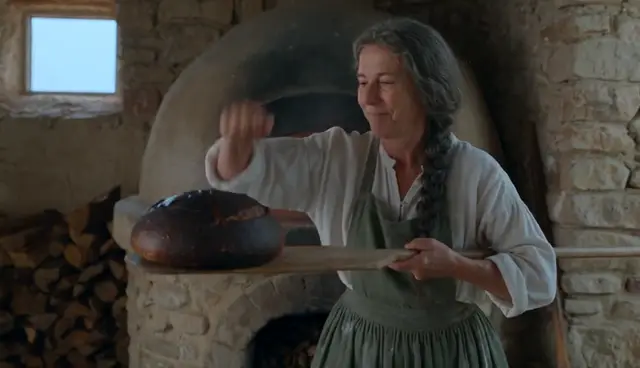
A baker with a long grey braid and a flour-dusted green apron takes bread out of a wood-fired oven in a small stone bakery at dawn.0–3 s: she slides a long wooden paddle into the glowing oven.3–6 s: she draws the paddle back out with a dark, crusty round loaf on it and turns toward us.6–8 s: she knocks on the loaf's crust with her knuckles and smiles.
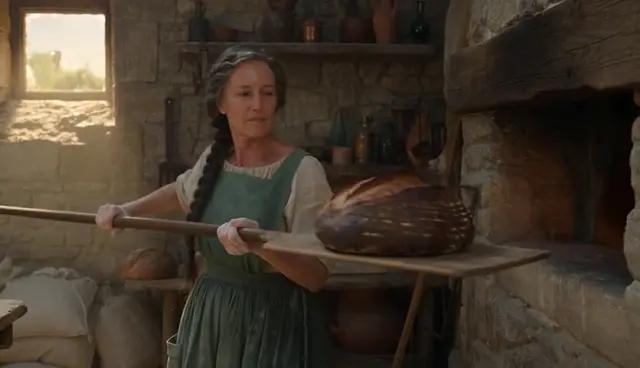
What came out: our baker, with her grey braid and green apron, doing all three things in order. But the model cut it into three shots, at 2.6 and 6.5 seconds, because we never said how to film it.
The lesson: timed steps (0–3 s, 3–6 s…) control what happens and when. They don't control the camera. Give each step one action.
Step 3 of 4
The camera
Step 2, plus one line:
The camera starts close on the glowing oven mouth from the first second, then pulls back slowly to a waist-high medium shot as she turns. One continuous take.
Show the full step 3 prompt
A baker with a long grey braid and a flour-dusted green apron takes bread out of a wood-fired oven in a small stone bakery at dawn.0–3 s: she slides a long wooden paddle into the glowing oven.3–6 s: she draws the paddle back out with a dark, crusty round loaf on it and turns toward us.6–8 s: she knocks on the loaf's crust with her knuckles and smiles.The camera starts close on the glowing oven mouth from the first second, then pulls back slowly to a waist-high medium shot as she turns. One continuous take.
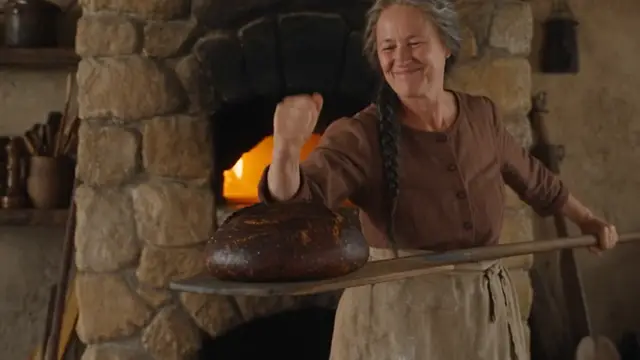
What came out: one continuous take that starts close on the oven and pulls back, as asked. Two things slipped: her green apron came out brown, and the loaf went in pale and came out baked a second later.
The lesson: say where the camera starts, how it moves, and "one continuous take". If a colour matters, name it twice: colours drift.
Step 4 of 4
Sound and the look
Step 3, plus:
Sound: the fire crackling, the paddle scraping on stone, a hollow knock when she knocks on the crust; no background music. Warm orange firelight on her face, cool blue dawn light from the window behind her, natural film look.
Show the full step 4 prompt
A baker with a long grey braid and a flour-dusted green apron takes bread out of a wood-fired oven in a small stone bakery at dawn.0–3 s: she slides a long wooden paddle into the glowing oven.3–6 s: she draws the paddle back out with a dark, crusty round loaf on it and turns toward us.6–8 s: she knocks on the loaf's crust with her knuckles and smiles.The camera starts close on the glowing oven mouth from the first second, then pulls back slowly to a waist-high medium shot as she turns. One continuous take.Sound: the fire crackling, the paddle scraping on stone, a hollow knock when she knocks on the crust; no background music. Warm orange firelight on her face, cool blue dawn light from the window behind her, natural film look.
What came out: the shot we had in mind. One take, the camera move, warm firelight on her face and a cool shaft of blue light from the window. The green apron came back. One miss: you never see her knock on the crust.
The lesson: light and sound belong in the prompt too. List the sounds you want, and end with "no background music" if you don't want a soundtrack.
The four parts, in order
- Who and where: one sentence with a person you could pick out of a crowd.
- What happens: timed steps, one action each.
- The camera: where it starts, how it moves, "one continuous take".
- Sound and light: the sounds you want, where the light comes from, the look.
What should you expect the first time?
- Every take comes out different, even with the same words (see the FAQ).
- A clip takes a few minutes: 2 to 5 for our 8-second clips, about 7 for a 30-second one. On busy evenings we have waited 10 to 20.
- Cost: chat apps include video in the plan, but it uses your allowance fastest. In SpeedReel, a 5-second Seedance 2.5 clip at 480p is 62 credits (about $0.62) and 8 seconds with sound is 99. New accounts get 250 free credits.
- The hard parts are words on screen, hands, fast action and plain logic: a loaf can't bake in a second. Watch every take yourself before you use it.
Questions
How to make AI videos: FAQ
Can ChatGPT make videos?
No. OpenAI closed Sora, its video app, on April 26, 2026, and ChatGPT has no video generator of its own. It can still write a good prompt for you to paste into a video app.
Is Gemini's video made with Veo?
Not anymore. The Gemini app makes video with Google's Gemini Omni (now Omni 1.2 Flash), which replaced Veo 3.1 there in May 2026, and Veo has left Google's Gemini API too. Veo is still offered to businesses on Google Cloud for now, and in some video apps (SpeedReel has Veo 3.1 Fast).
Why did one video use up my Gemini limit?
Gemini plans share one usage allowance across chat, images and video. It refills every 5 hours up to a weekly cap, and Google says video uses the most. Video apps charge per clip instead, and show the price before you generate.
Why are AI videos only 8 or 10 seconds long?
Each generation makes one shot: up to 10 seconds in Gemini (15 on AI Ultra), and up to 30 with Seedance 2.5 in a video app. Longer videos are several shots edited together, or one shot extended.
Why does the same prompt give a different video every time?
Every generation starts from fresh random noise, so the same words make a new take each time. We ran our step 4 prompt three times and got three different bakeries, but the same order of events, because the prompt fixed the order.
Why was my harmless prompt or photo refused?
Video models refuse photos of real-looking people, and their copyright checks react to faces or scenes that look like famous ones, even when you name no one. Our own one-sentence baker was refused once, then passed on a retry. The detailed versions, with a baker described down to her grey braid, were never refused.
Can I use AI videos for my business, and do I own them?
It depends on each app's terms, so read them before you sell anything. Some apps add a watermark you aren't allowed to remove (Grok does). In the US, footage made entirely by AI generally can't be copyrighted (US Copyright Office, January 2025).
Where to go next
- How to make AI videos with Seedance 2.5: why 2.5, where to use it, and seven reasons a video doesn't match the prompt, each with the fix that worked.
- Prompt libraries: camera moves, lighting and text on screen, each prompt beside the clip it made.
- Generate in SpeedReel ↗
How we tested: every clip on this page was made with Seedance 2.5 in SpeedReel on October 31, 2026: text-to-video, 480p, 16:9, 8 seconds, with sound, unedited. The step 4 prompt was run three times; steps 1 to 3 are single takes, except that step 1's first attempt was refused. The chat-app facts were checked on each company's own pages and rechecked on November 1, 2026. PromptJazz makes its clips in SpeedReel, a friendly partner (About).