
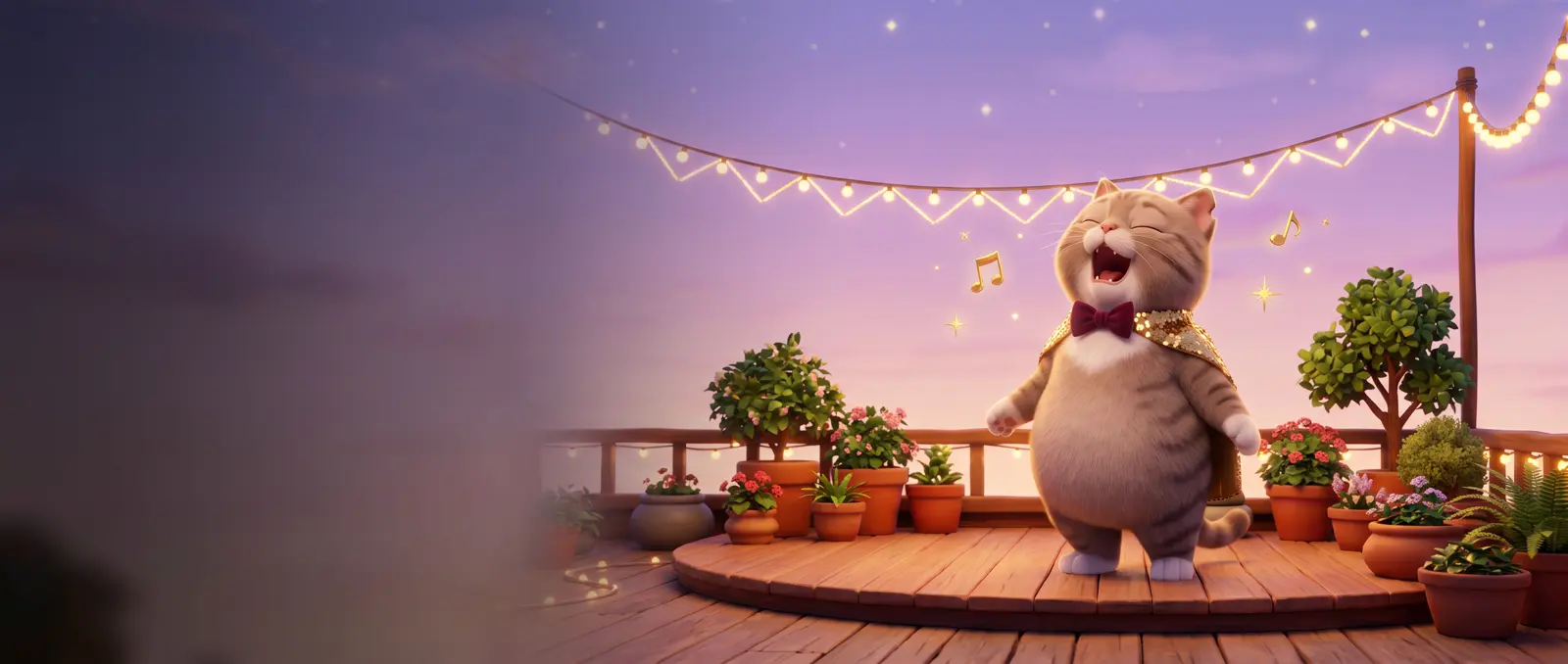
先說結論
幫歌手做一張角色設定圖,每個場景各準備一張圖,再把你的歌存成 MP3,當參考音訊放進每個鏡頭。我們實測,三支影片都唱同一首歌的同一段。我們的胖虎斑貓從屋頂、自助洗衣店到夜間公車都認得出是同一隻,也照指示換上了金色舞台披風。還沒有歌?可以用影片 App 直接生成,或用 Suno 這類音樂生成工具。
做 AI MV 需要準備什麼?
- 你的歌,存成 MP3。Seedance 不收我們的 .m4a 檔,同一段音訊轉成 MP3 就可以。
- 歌手設定圖:歌手的三視圖,再加一張唱高音用的表情圖。做法請看角色三視圖提示詞(指令)。
- 每個場景一張圖,畫面裡不要有人。
- 能放參考音訊的影片模型。Seedance 2.5 可以;SpeedReel 每個鏡頭最多放 3 段音訊。
步驟 1:歌
已經有歌的話,每個鏡頭剪出需要的那一段(10 秒的鏡頭就剪 10 秒),存成 MP3。
還沒有歌,有兩個方法:
- 讓影片 App 直接唱。我們寫了兩句歌詞,在第一個鏡頭請它唱。Seedance 配著低音大提琴和鼓唱出來,也通過了音訊版權檢查。接著把那支影片的音訊剪出來,當後面鏡頭的歌。用免費工具 ffmpeg 一行指令就能搞定:
ffmpeg -i first-shot.mp4 -vn -c:a libmp3lame -b:a 192k song.mp3 - 用 Suno 這類音樂生成工具,做好再上傳。先看清楚條款:免費和付費方案的商用規定不一樣。
歌詞請自己寫。用真實歌曲的歌詞,或模仿知名歌手的聲音,都會觸發版權檢查。
步驟 2:歌手
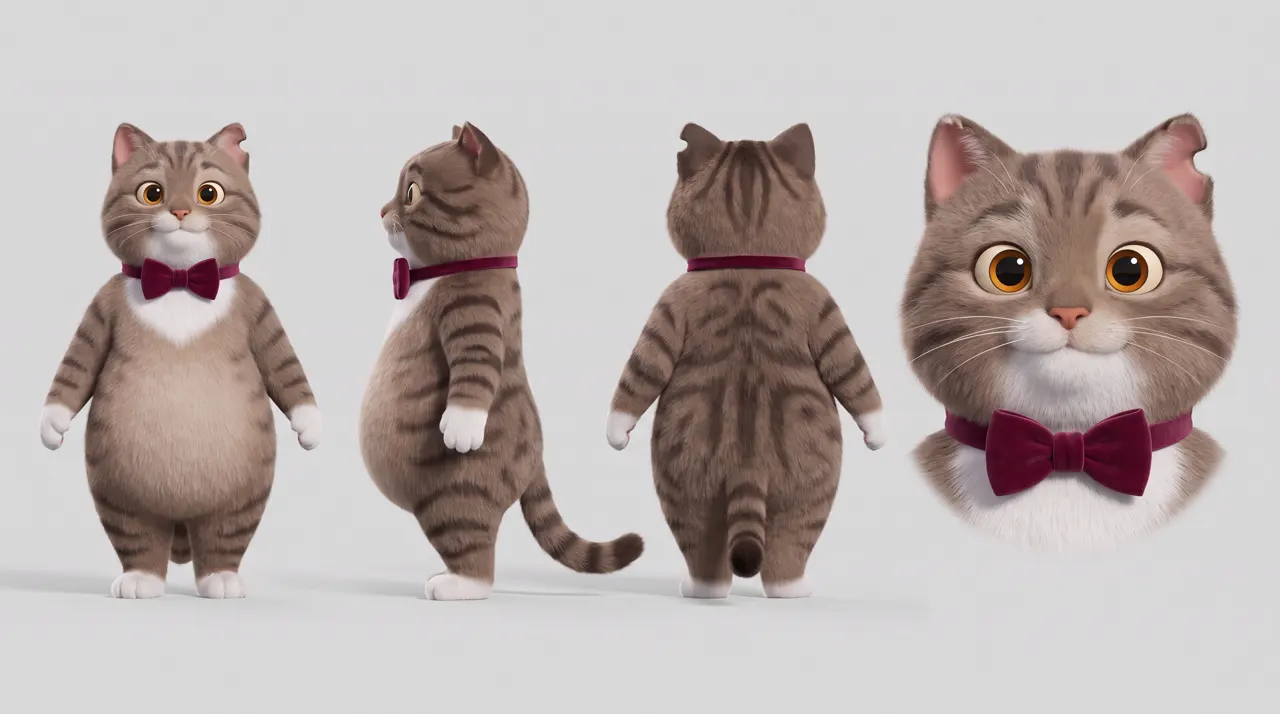
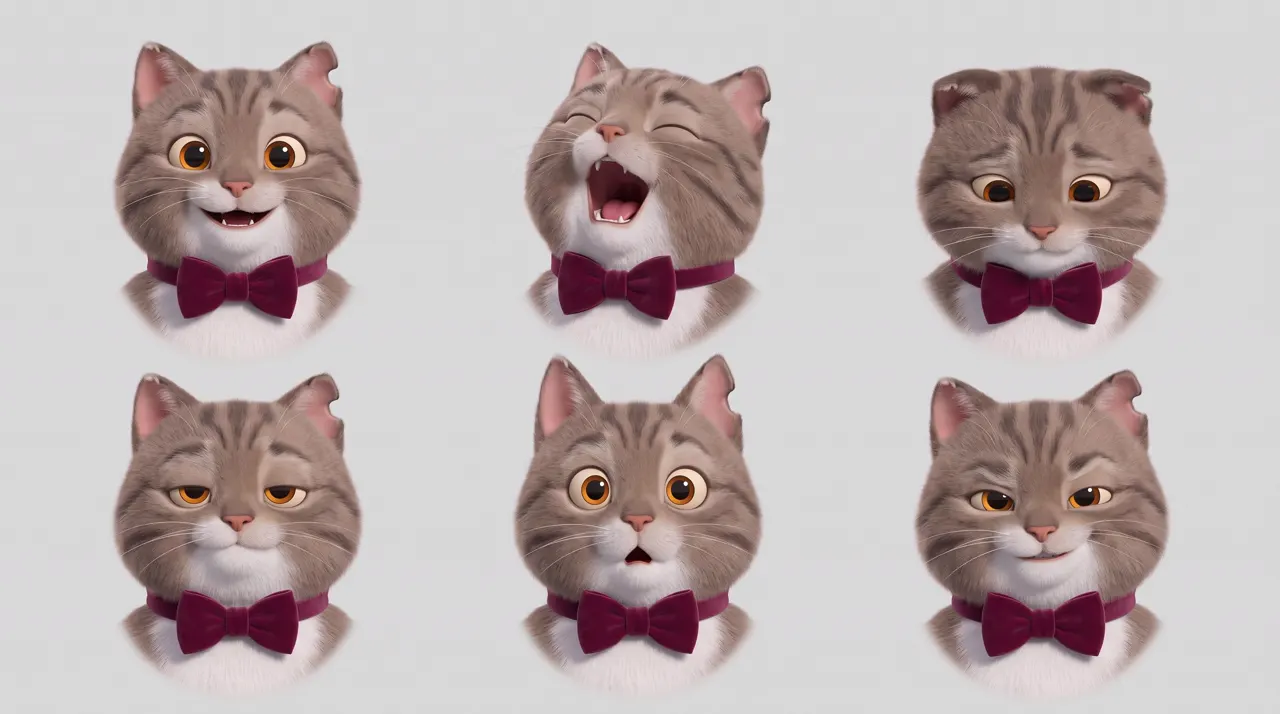
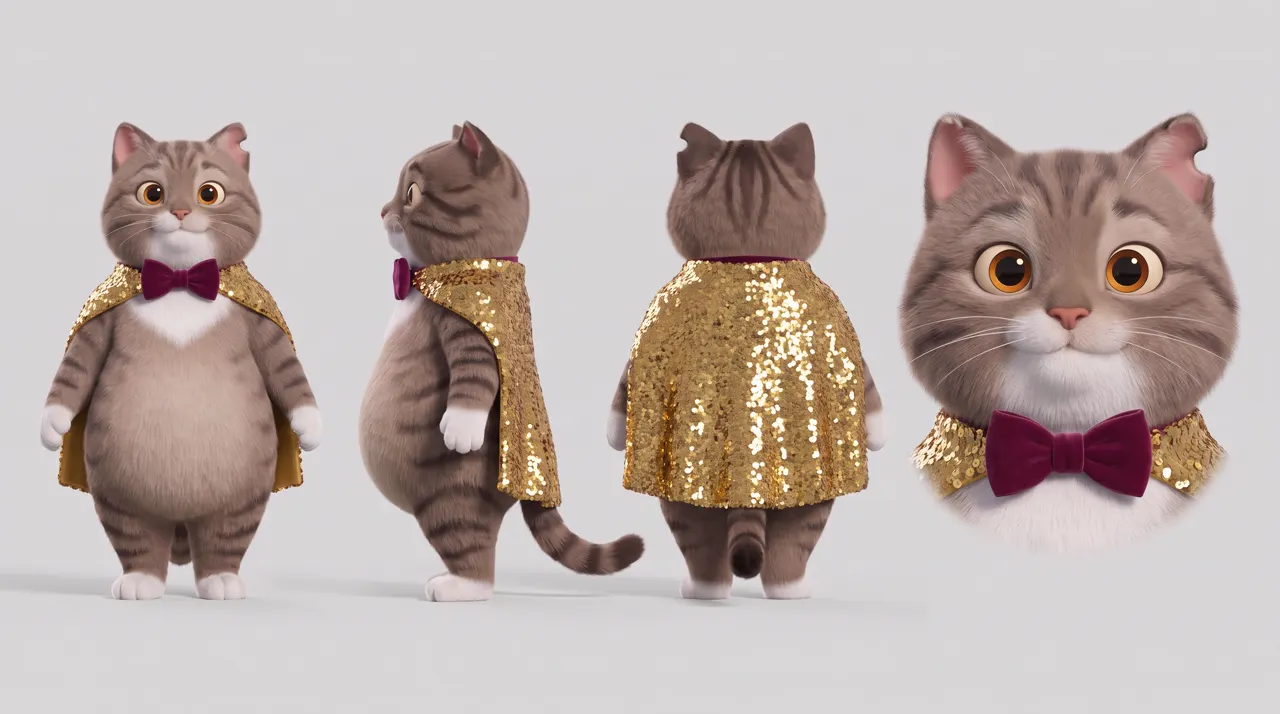
我們的歌手是一隻胖虎斑貓:白色圍兜毛、琥珀色眼睛、左耳有個缺角,打著酒紅色絲絨領結。牠有三張設定圖:三視圖、六種表情,以及用三視圖改出來的舞台裝(金色亮片披風)。舞台裝的設定圖,只放在歌手穿那套衣服的鏡頭裡。
步驟 3:場景

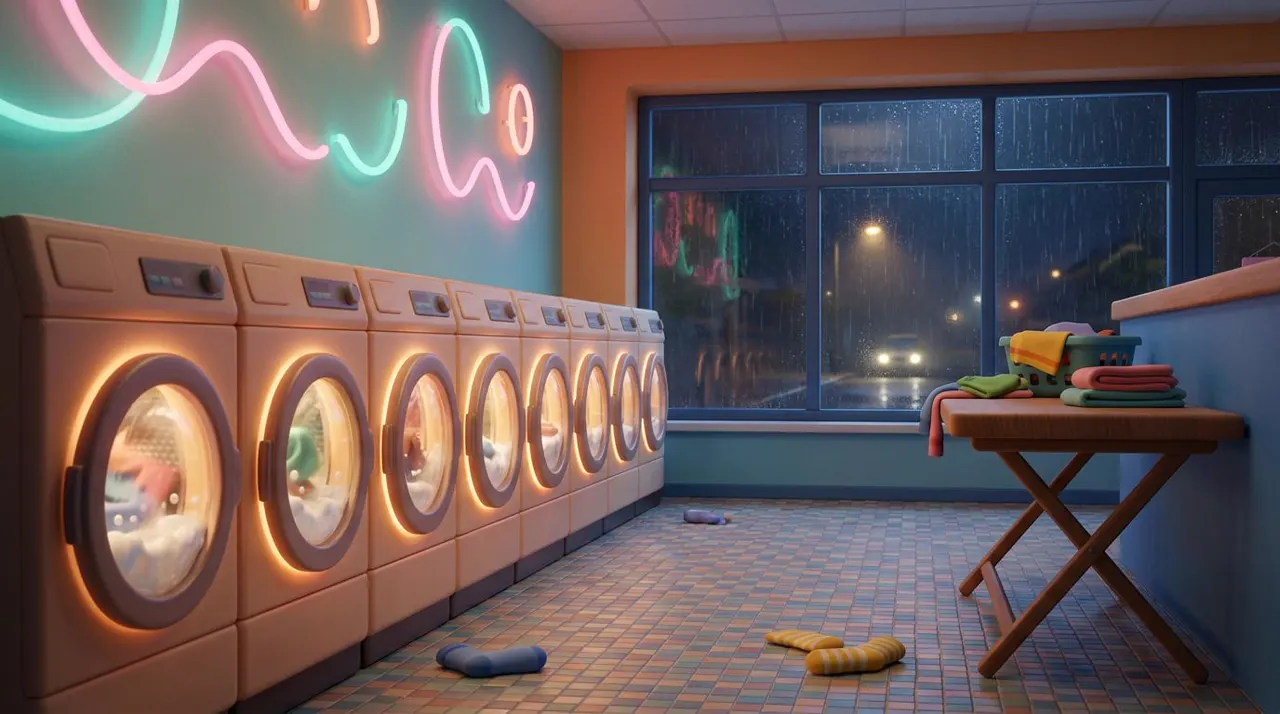
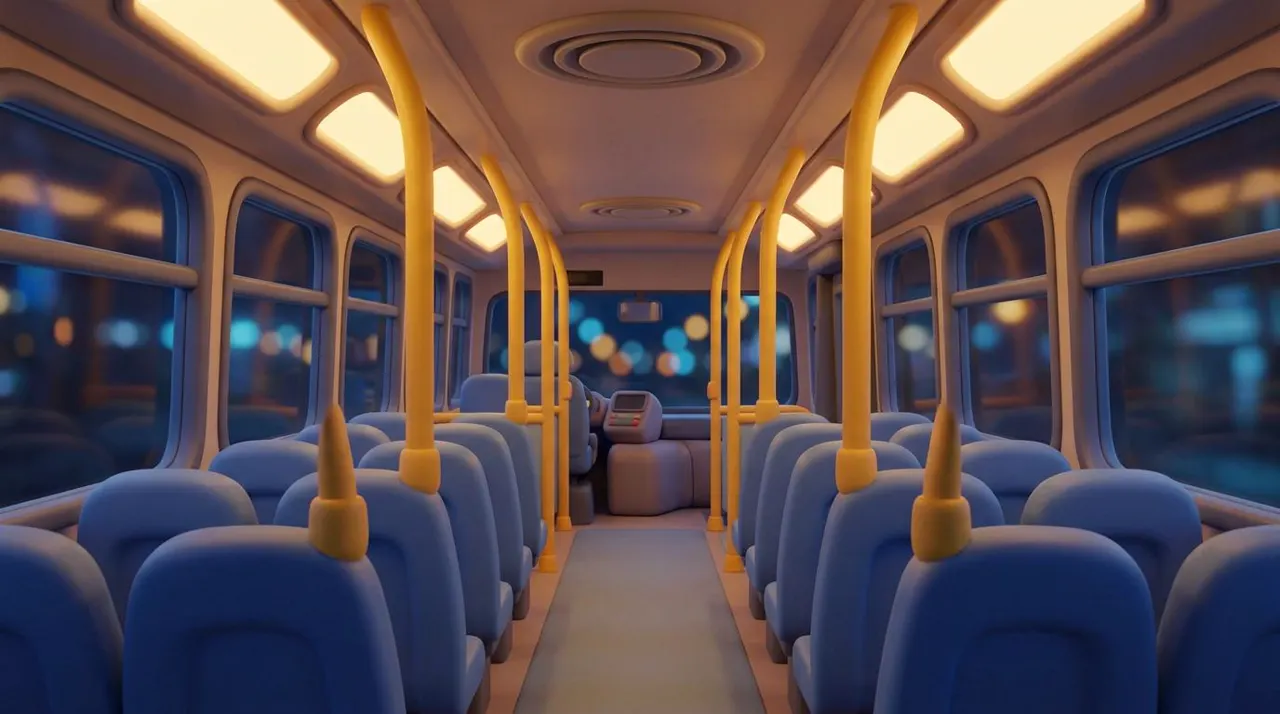
每個場景一張沒有人的圖,畫風都跟歌手一樣。我們第一張公車圖,就算提示詞寫了「柔和 3D 動畫風格」,還是做成照片風。把洗衣店那張當畫風參考放進去,就修好了。
AI MV 提示詞(指令)範本
@Image1:歌手(角色)。@Image2:歌手的表情(角色)。@Image3:[場景](場景)。@Audio1:這首歌(音樂和人聲)。[畫風句,每個鏡頭都一樣。]@Image1 的[歌手],穿著[服裝],[時間]在 @Image3 的[場景]唱歌,聲音和旋律跟 @Audio1 的歌一樣。0–3 秒:[鏡頭和動作]。3–6 秒:[運鏡,跟著節奏搖擺]。6–8 秒:特寫,[表情],像 @Image2 那樣。聲音:@Audio1 的歌,同樣的嗓音和樂器。一致性:[特徵和服裝]都和 @Image1 一樣。
英文原文(產生範例影片的提示詞)
@Image1: the singer (character). @Image2: the singer's expressions (character). @Image3: the [place] (location). @Audio1: the song (music and voice).[Style line, the same in every shot.] The [singer] from @Image1, in [outfit], sings in the [place] from @Image3 at [time], in the same voice and melody as the song in @Audio1.0–3 s: [shot and action].3–6 s: [camera move, swaying to the beat].6–8 s: close-up, [expression] like @Image2.Sound: the song from @Audio1, with the same voice and instruments.Consistency: same [features and outfit] as @Image1.
第一個鏡頭還沒有歌,就拿掉 @Audio1,把歌詞用引號寫進動作句,聲音那行寫出要用的樂器。
我們的三個鏡頭
鏡頭 1/3
屋頂:這支生成了歌曲
@Image1:貓咪歌手(角色)。@Image2:貓咪的表情(角色)。@Image3:屋頂(場景)。柔和的 3D 動畫風格:圓潤的造型、蓬鬆的毛、溫暖飽滿的色彩。@Image1 那隻胖胖的虎斑貓,打著酒紅色絲絨領結站著,黃昏時在 @Image3 的屋頂小舞台上、溫暖的串燈下唱歌。0–3 秒:遠景,貓咪走進燈光裡,深吸一口氣。3–7 秒:中景,貓咪用溫暖滑順的爵士嗓音唱著:"Coins in my pocket, the dryer hums low,"7–10 秒:特寫,眼睛緊閉,像 @Image2 那樣飆高音:"I'll sing till the morning, with nowhere to go."聲音:貓咪的歌聲,配上輕柔的低音大提琴和刷鼓。一致性:條紋、白色圍兜毛、琥珀色眼睛、缺角的耳朵和領結都和 @Image1 一樣。
英文原文(產生範例影片的提示詞)
@Image1: the cat singer (character). @Image2: the cat's expressions (character). @Image3: the rooftop (location).Soft 3D animated look: rounded shapes, plush fur, warm rich colour. The chubby tabby cat from @Image1, standing upright in its burgundy velvet bow tie, sings on the little rooftop stage from @Image3 at dusk under warm string lights.0–3 s: wide shot, the cat steps into the light and takes a breath.3–7 s: medium shot, the cat sings in a warm, smooth jazzy voice: "Coins in my pocket, the dryer hums low,"7–10 s: close-up, eyes squeezed shut, belting the high note like @Image2: "I'll sing till the morning, with nowhere to go."Sound: the cat's singing over a soft upright bass and brushed drums.Consistency: same stripes, white bib, amber eyes, notched ear and bow tie as @Image1.
鏡頭 2/3
自助洗衣店,換上舞台披風,用鏡頭 1 的歌當參考音訊
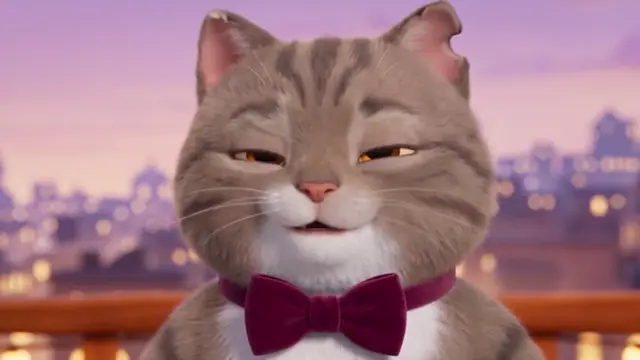
@Image1:穿上舞台披風的貓咪歌手(角色)。@Image2:貓咪的表情(角色)。@Image3:自助洗衣店(場景)。@Audio1:這首歌(音樂和人聲)。柔和的 3D 動畫風格:圓潤的造型、蓬鬆的毛、溫暖飽滿的色彩。@Image1 那隻胖胖的虎斑貓,打著酒紅色領結、披著金色亮片披風,夜晚在 @Image3 的霓虹自助洗衣店裡唱歌,聲音和旋律跟 @Audio1 的歌一樣。0–3 秒:中景,貓咪靠在轉動的洗衣機上唱歌,披風映著粉紅和青綠色霓虹。3–6 秒:鏡頭慢慢繞著貓咪轉,牠跟著節奏搖擺。6–8 秒:特寫,眼睛緊閉,像 @Image2 那樣飆高音。聲音:@Audio1 的歌,同樣的嗓音、輕柔的低音大提琴和刷鼓。一致性:條紋、白色圍兜毛、琥珀色眼睛、缺角的耳朵、領結和金色披風都和 @Image1 一樣。
英文原文(產生範例影片的提示詞)
@Image1: the cat singer in its stage cape (character). @Image2: the cat's expressions (character). @Image3: the laundromat (location). @Audio1: the song (music and voice).Soft 3D animated look: rounded shapes, plush fur, warm rich colour. The chubby tabby cat from @Image1, in its burgundy bow tie and sequinned gold cape, sings in the neon laundromat from @Image3 at night, in the same voice and melody as the song in @Audio1.0–3 s: medium shot, the cat leans on a spinning washing machine and sings, the cape catching the pink and teal neon.3–6 s: the camera circles slowly as the cat sways to the beat.6–8 s: close-up, eyes squeezed shut, belting the high note like @Image2.Sound: the song from @Audio1, with the same voice, soft upright bass and brushed drums.Consistency: same stripes, white bib, amber eyes, notched ear, bow tie and gold cape as @Image1.
鏡頭 3/3
夜間公車,沒有披風,用鏡頭 1 的歌當參考音訊
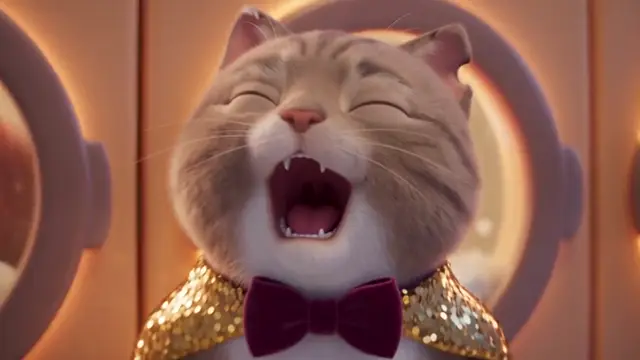
@Image1:貓咪歌手(角色)。@Image2:貓咪的表情(角色)。@Image3:夜間公車(場景)。@Audio1:這首歌(音樂和人聲)。柔和的 3D 動畫風格:圓潤的造型、蓬鬆的毛、溫暖飽滿的色彩。@Image1 那隻胖胖的虎斑貓,只打酒紅色絲絨領結、沒有披風,一個人在 @Image3 空蕩蕩的夜間公車上唱歌,聲音和旋律跟 @Audio1 的歌一樣。0–3 秒:中景,貓咪坐在窗邊,城市燈光從窗外劃過,開始輕聲唱。3–6 秒:貓咪站起來,抓著黃色扶桿,跟著公車搖晃。6–8 秒:特寫,閉著眼睛,在最後一個音上露出幸福的笑容,像 @Image2 那樣。聲音:@Audio1 的歌,同樣的嗓音、輕柔的低音大提琴和刷鼓,底下是低沉的公車引擎聲。一致性:條紋、白色圍兜毛、琥珀色眼睛、缺角的耳朵和領結都和 @Image1 一樣。
英文原文(產生範例影片的提示詞)
@Image1: the cat singer (character). @Image2: the cat's expressions (character). @Image3: the night bus (location). @Audio1: the song (music and voice).Soft 3D animated look: rounded shapes, plush fur, warm rich colour. The chubby tabby cat from @Image1, in its burgundy velvet bow tie and no cape, sings alone on the empty night bus from @Image3, in the same voice and melody as the song in @Audio1.0–3 s: medium shot, the cat sits by the window, city lights streaking past, and starts to sing softly.3–6 s: the cat stands, holds a yellow grab pole and sways with the bus.6–8 s: close-up, eyes closed, a happy smile on the last note like @Image2.Sound: the song from @Audio1, with the same voice, soft upright bass and brushed drums, under a low bus engine hum.Consistency: same stripes, white bib, amber eyes, notched ear and bow tie as @Image1.
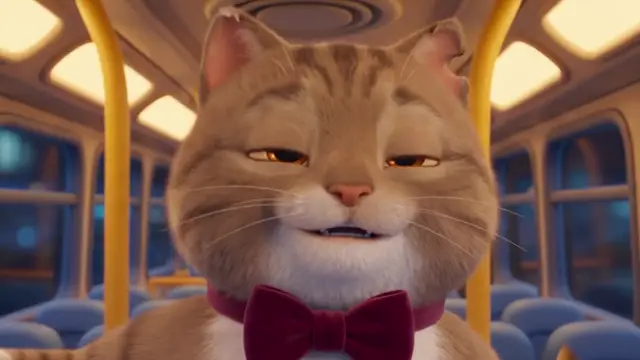
結果:
- 歌延續下來了:鏡頭 2 和 3 唱的是鏡頭 1 同一段歌,同樣的嗓音、同樣的低音大提琴和鼓。
- 歌手:屋頂和洗衣店是同一隻貓,披風和領結都照指示。到了公車上毛色偏暖,有點變成橘貓,但領結還在。只做一次說不準是不是公車暖光造成的;可以再跑一次,或加一句光線描述,像「冷調的灰棕色條紋」。
- 服裝沒有混在一起:披風只出現在洗衣店。
- 場景都和參考圖一致。
- 高音:特寫抓到了表情圖裡「飆高音」的那張臉。
參考音訊不另外收費:480p 的 8 秒鏡頭 99 點,10 秒 124 點。三個鏡頭共 322 點。
AI MV 可以用自己的臉嗎?
在 Seedance 裡不行。它會擋看起來像真人的參考圖,AI 生成的也一樣,所以我們才用貓。替代做法:
- 風格化版本的你:以你的樣子為原型的動畫、3D 或黏土角色。風格化的設定圖我們每次都通過。
- 用文字描述一個人,再重複使用:先做一支影片,再把它當參考影片放進其他鏡頭。詳細做法請看一致性指南。
常見問題
AI MV:常見問題
可以用自己的歌做 AI MV 嗎?
可以。每個鏡頭都把歌當 MP3 參考音訊放進去,並剪成跟鏡頭一樣長的段落。
可以用 AI 做歌嗎?可以用 Suno 嗎?
可以。像我們一樣,讓影片模型在第一個鏡頭唱你寫的歌詞,再把那段音訊拿來重複使用;或是用 Suno 這類音樂生成工具做好歌再上傳。要商用之前,先看清楚工具的條款:免費和付費方案的規定不一樣。
歌手每個鏡頭都會長得一樣嗎?
大致上會,前提是每個鏡頭都放角色設定圖。我們的貓三個鏡頭的花紋和領結都撐住了,只有最後一支毛色偏暖。剪輯前每支都要檢查。
AI 歌手能對嘴我的歌嗎?
可以。把你的歌當參考音訊,我們的貓在後面兩個鏡頭都唱同一段,嘴型跟著歌詞動。每支都要檢查,歌詞快的地方尤其要注意。
AI MV 可以用自己的臉嗎?
在 Seedance 裡不行,它會擋看起來像真人的參考圖,AI 生成的也一樣。可以改用以你為原型的風格化角色,或先用文字做出一支影片、再把它當參考影片。
AI MV 可以做多長?
Seedance 2.5 每個鏡頭 4 到 30 秒。整支 MV 就是很多鏡頭配著你的歌剪在一起。
接下來看什麼
- 角色三視圖提示詞(指令):貓咪三張設定圖的完整提示詞。
- AI 影片角色一致性教學
- Seedance 參考音訊和其他功能:Seedance 2.5 教學:好在哪?效果怎麼調?
- 其他範本:商品影片 · AI 短劇。
- 在 SpeedReel 生成 ↗
測試方式:三支影片都在 2026 年 11 月 3 日用 SpeedReel 的 Seedance 2.5 生成:480p、16:9、有聲,每個鏡頭只跑一次,未經剪輯。鏡頭 1 的音訊用 ffmpeg 剪出、存成 MP3,再上傳當鏡頭 2 和 3 的參考音訊。歌詞是我們自己寫的。PromptJazz 用 SpeedReel 製作影片,雙方是友好的合作夥伴(關於)。