
The short answer
Make one picture of everything that must stay the same: each character, each place, each product. Attach those pictures to every shot as reference images, describe each thing with the same words every time, and end the prompt with a short list of rules. In our test, a character kept her look across three ages with the pictures and lost it with words alone. One catch: Seedance blocks reference photos of realistic people, even AI-made ones. There is a way around it, below.
What is character consistency in AI video?
Character consistency means the same person looks the same in every shot: same face, hair, clothes and colours. The same goes for places (the room doesn't rearrange itself) and products (the logo doesn't melt).
It matters as soon as you make more than one shot. An ad, a music video or a short film is several clips edited together, and viewers notice when the hero's jacket changes colour between cuts.
Why do AI characters change between shots?
Every clip starts from fresh random noise. The model doesn't remember your last shot, so it rebuilds the character from your words each time, and words leave a lot open.
In an earlier test of ours, "bright yellow jacket" came out red in 5 of 7 clips. "A girl with a braid" can be a hundred different girls.
The four tools that keep things consistent
- A reference kit. One picture per thing that must not change: a character sheet (front, side, back and a face close-up), a picture of each place, a picture of each product or prop. How to make them: AI character sheet prompts.
- One fixed description per thing, pasted word for word into every prompt. "A thick copper-red braid to her waist, freckles, green eyes." Never "red hair" in one shot and "auburn" in the next.
- A rules block at the end of the prompt: one line that says what must stay the same.
- A shot plan. Write every shot before you make the first one, so the places, props and light are decided once.
Here is the shape of every prompt in this guide. Copy it and fill the blanks:
@Image1: [character] (character). @Image2: [prop] (prop). @Image3: [place] (location).[Style line, the same in every shot.] [Character] from @Image1, [fixed description], [does what] in [place] from @Image3, [time of day].0–4 s: [shot and action].4–7 s: [shot and action].7–10 s: [shot and action].Sound: [2 or 3 plain sounds]; no background music.Consistency: same [face, hair, outfit, prop] as @Image1 and @Image2.
We tested it: one girl, three ages
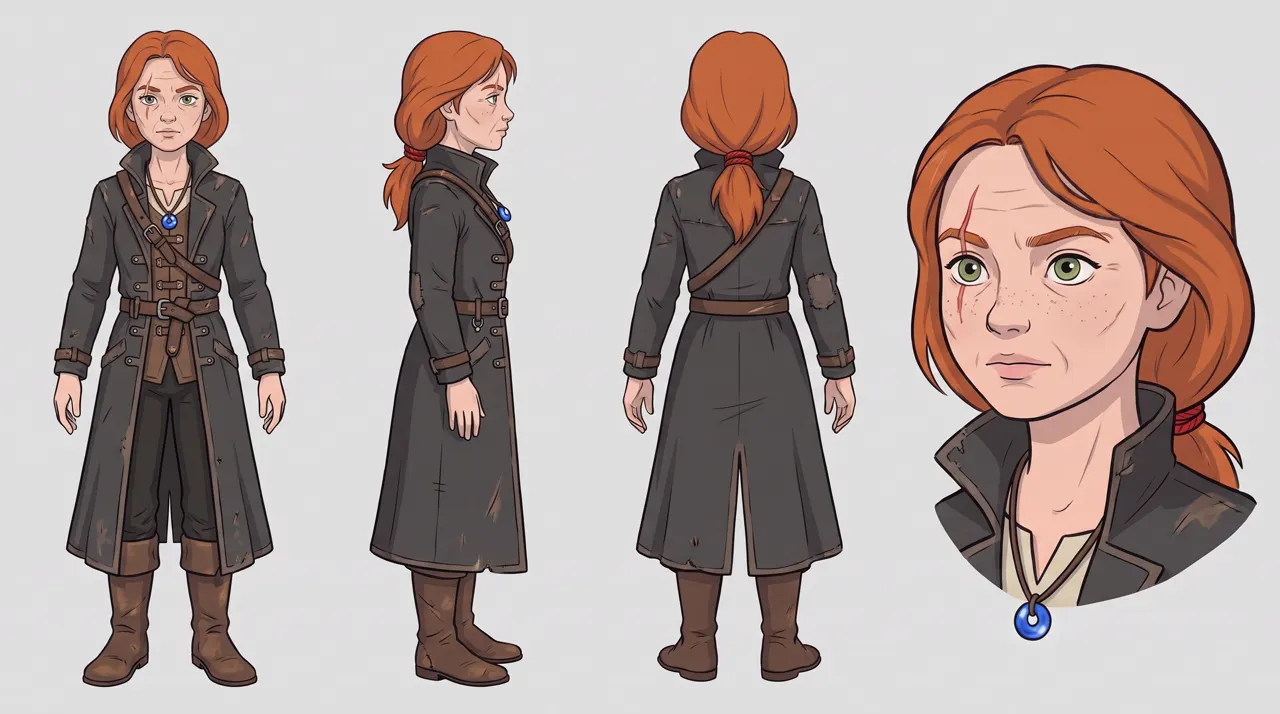
The hardest consistency job there is: the same character growing up. Mira is a red-haired village girl who becomes a monster hunter. We made her at 15, 19 and 30, each shot twice:
- with the kit: her character sheet for that age, a sheet of her amulet, and a picture of the place;
- with words only: the same prompt, minus the pictures.
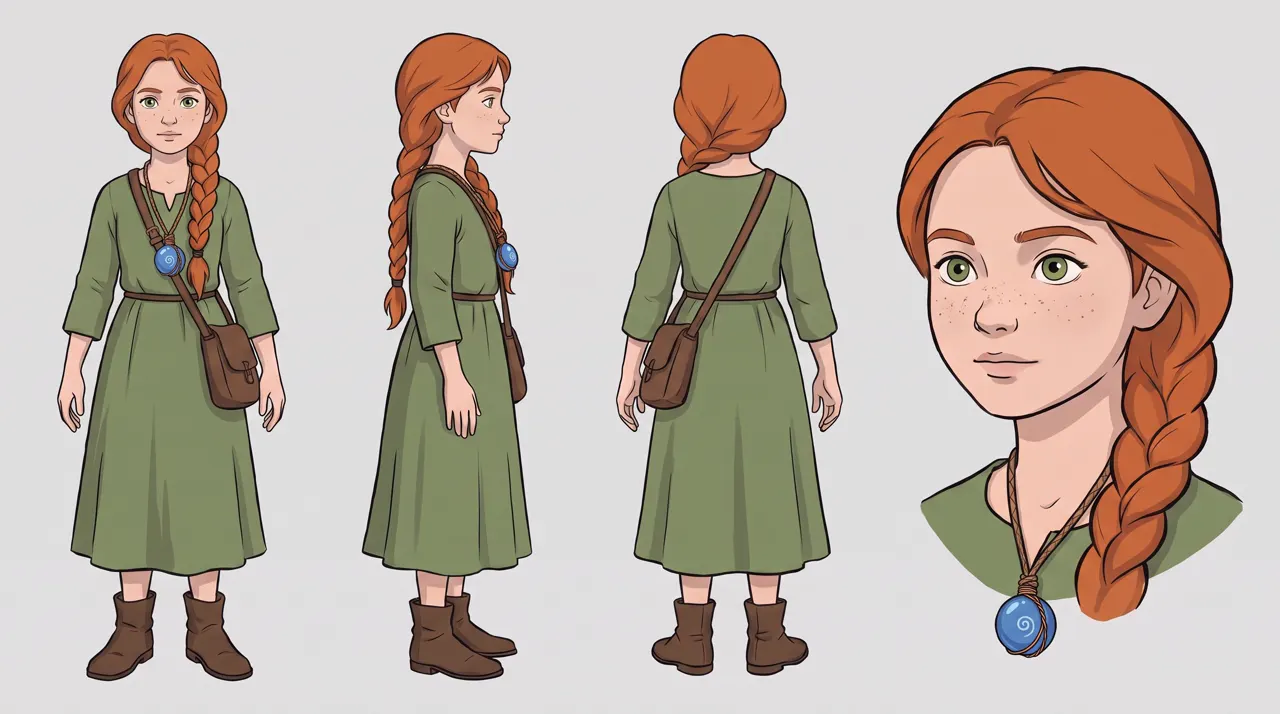
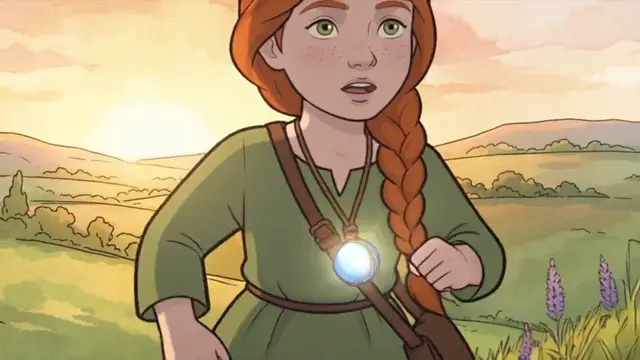
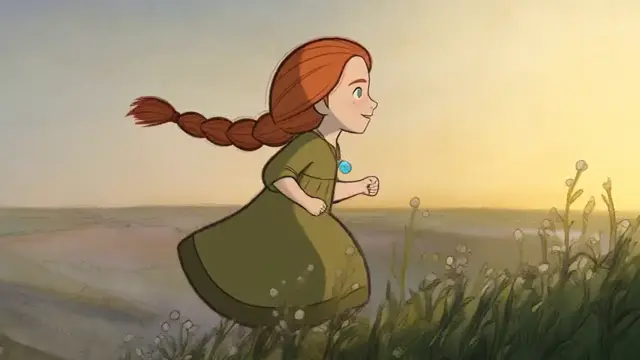
Age 15. The kit kept the windmill village from its picture; words alone invented a different hill.
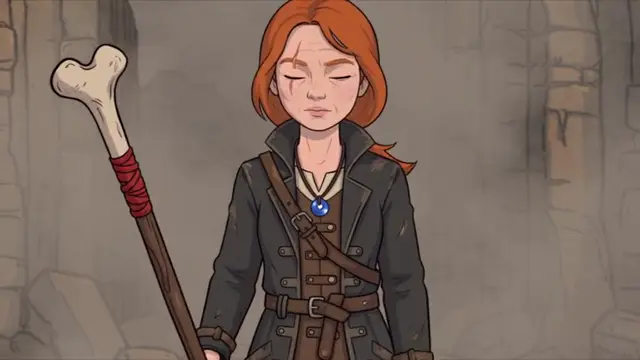
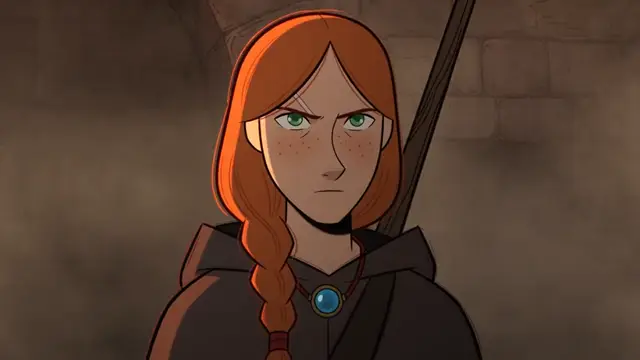
Age 30. With words alone, her braid grew back and the scar faded.
| With the kit | Words only | |
|---|---|---|
| Places | All 3 matched their pictures: the windmill village, the birch forest, the ruined keep | All 3 changed: a different hill, a different forest, rubble with no keep |
| Mira at 30 | Short braid tied with a red cord, pale scar, older face, amulet | Long braid again, no clear scar, a younger face, a hood |
| Art style | The same hand-drawn look in all 3 | Hand-drawn, with a rounder, more cartoon face at 15 |
Two things slipped even with the kit: her amulet glowed in the first shot, which we never asked for, and her "spear with a bone tip" came out as a staff topped with a whole bone.
The lesson: pictures hold what words can't. That means the exact place, and details that change over a story, like a haircut or a scar.
Show the age-30 prompt, with the kit
@Image1: Mira at 30 (character). @Image2: her amulet (prop). @Image3: the ruined keep (location).Hand-drawn rotoscoped animation: motion traced from live action, clean ink outlines, flat cel colours, soft hand-painted watercolour backgrounds. Mira from @Image1, now a seasoned monster hunter of about 30, with the same face and freckles, green eyes, a shoulder-length copper-red braid tied with a red cord and a thin pale scar through one eyebrow, in a long charcoal hunter's coat, wearing the blue glass bead amulet from @Image2, walks out of the smoke at the ruined keep from @Image3 at dusk, carrying a long spear with a bone tip.0–4 s: wide shot, smoke drifts across the ruins and she walks out of it toward us.4–7 s: medium tracking shot, her coat moving, the braid and scar clear in the low orange light.7–10 s: she stops, touches the blue bead amulet at her chest and closes her eyes; close-up.Sound: crackling embers, wind, her boots on stone; no background music.Consistency: same face, braid, freckles, scar and amulet as @Image1 and @Image2; the art stays hand-drawn throughout.
Do places and products work the same way?
Yes. A place is just another reference picture. A people-free picture of the room, street or landscape works best, because a person in it pulls focus.
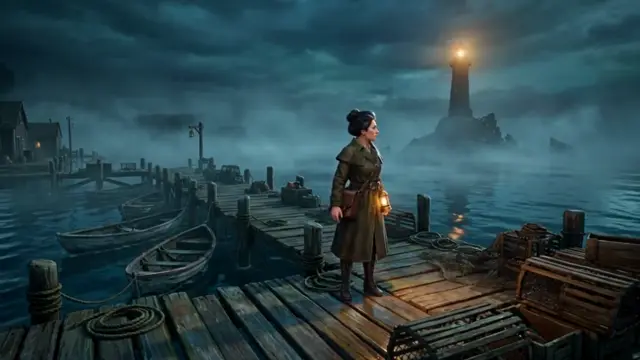
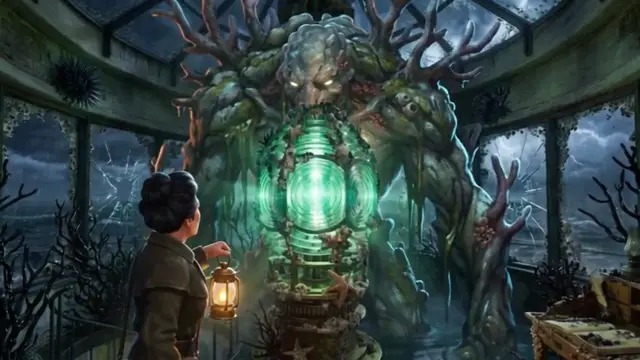
Our horror series: the dock and the lamp room matched their pictures in all 3 episodes. The overgrown room came from a picture edited from the clean one, with the stairs, desk and lens in the same places.
Products drift the most, because models know famous products better than yours. We made the same frying-pan shot twice, once with a product sheet and once described in words:
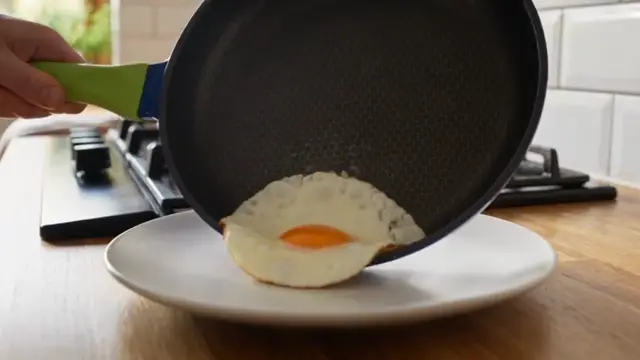
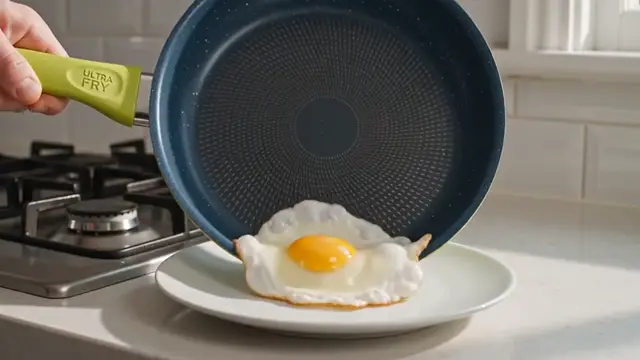
With the sheet, the pan matches: cobalt-blue outside, lime-green handle, honeycomb surface. From words, the label survived but the pan grew a lime-green base and lost the honeycomb.
More in the AI product video template.
Can you use realistic people? The face filter
Not as a reference picture, not in Seedance. ByteDance blocks reference images that look like a real person, and AI-made faces count. The filter judges the pixels, not where the picture came from.
What we tried, November 3, 2026:
| Reference picture | Look | What happened |
|---|---|---|
| A cyberpunk courier | Realistic person, made in Nano Banana Pro | Refused on submit: "the input image may contain real person" |
| A Gen-Z skater | Realistic person | Refused on submit |
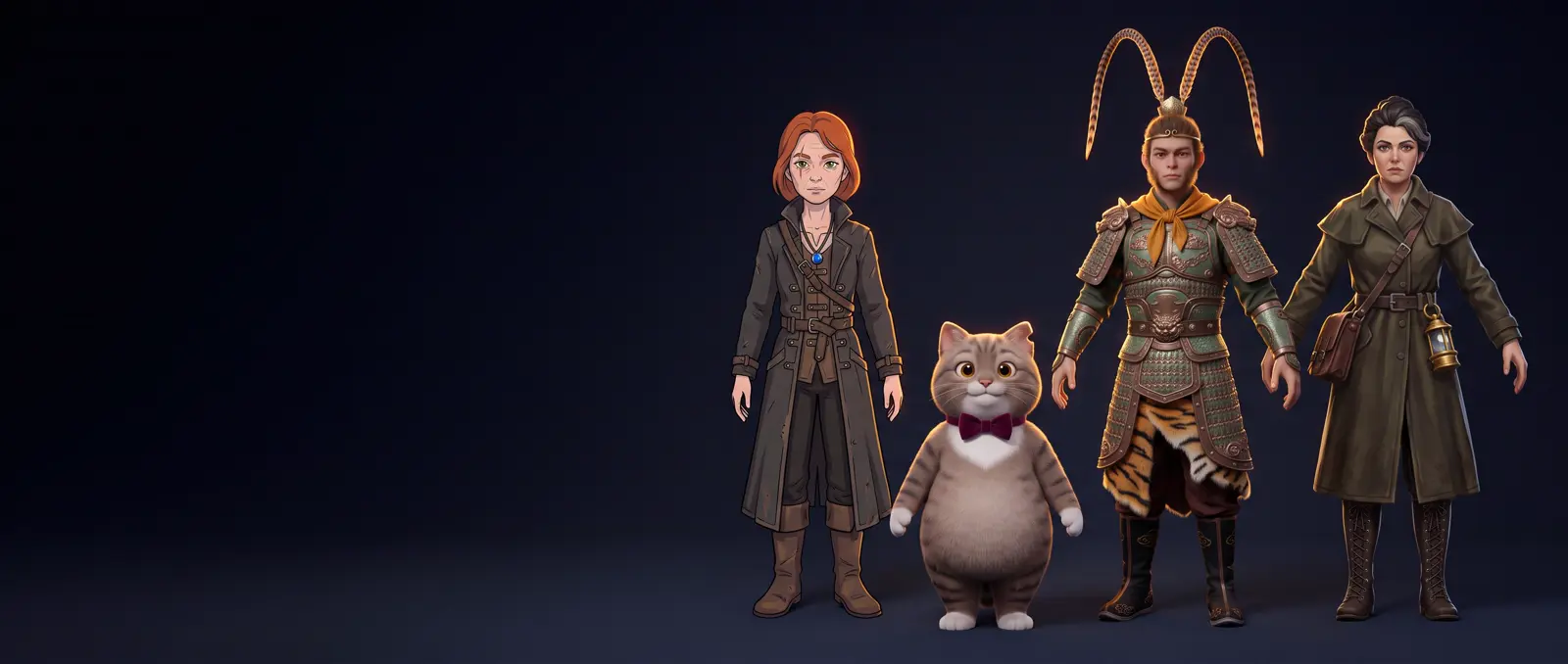
| A Monkey King warrior | Realistic 3D, a human face with monkey features | Passed, and matched his sheet closely |
| An investigator | Video-game cutscene look | Passed, and matched her sheet closely |
| A tabby cat, an anime girl | Stylized | Passed every time |
A refusal on submit costs nothing; the job never starts.
Three ways to work with realistic people anyway
- Reuse your own clip. Describe the person in words, with features you could pick out of a crowd, and generate one short clip. When it looks right, attach that clip as a reference video for every later shot. BytePlus lets unmodified Seedance clips back in as references for 30 days on the same account. We did this 3 times (a courier, a skater and a model) and got the same person in the second shot each time.
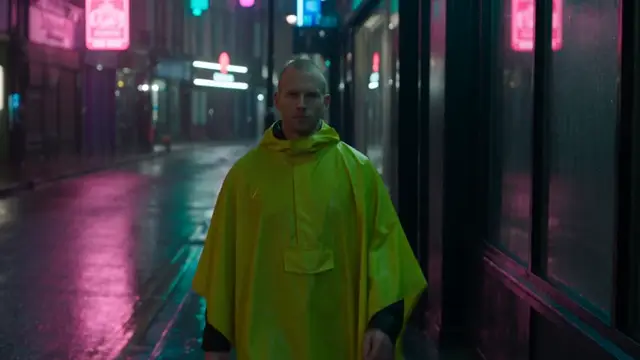
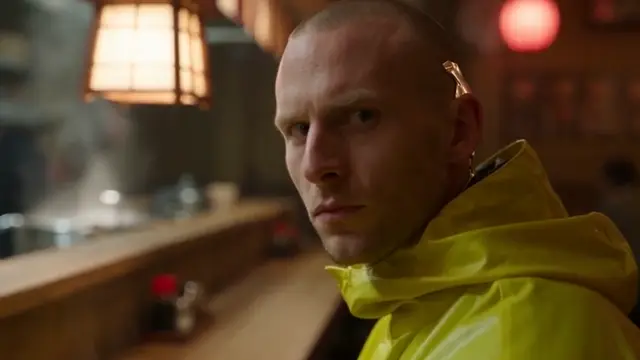
The catch: it copies the first clip exactly, mistakes included. Our words put the courier's chrome implant behind his ear instead of on his jaw, and the second clip kept it there. So re-roll the first clip until it's right, then build every shot from it.
- ByteDance's approved people. BytePlus offers a library of more than 10,000 approved virtual humans, and you can use them in SpeedReel too. Vetted business customers can also verify a real person's likeness, with that person's consent.
- Go stylized. Anime, 3D animation, clay or a game-cutscene look all passed. Our AI series template uses a game look for exactly this reason.
How to tag your reference pictures
- Open with a binding list: "@Image1: Mira at 15 (character). @Image2: her amulet (prop). @Image3: the village (location)." Then mention each tag where it matters.
- Numbers follow upload order. The first picture you attach is @Image1. Name your files the same way so you don't mix them up.
- Use one label style. Don't write @Image1 in one line and "picture 1" in the next.
- Repeat the 2 or 3 traits that matter in the action lines. A single mention at the top fades over a long clip.
- For audio references, upload an MP3. Seedance rejected our .m4a file.
A checklist before you keep a take
Watch every take once just for these:
- Face, hair and eye colour.
- Outfit colours and details: scars, jewellery, logos.
- The prop in their hand is the right one.
- The furniture is where it was.
- The light comes from the same side, at the same time of day.
- Product shape and label.
- Anything that appeared without being asked. Our amulet glowed, and a "wet, dark shape" became octopus tentacles.
How do other tools handle consistency?
We tested Seedance 2.5. Here is what each other tool calls the same idea, from the companies' own pages, not tested by us:
| Tool | Feature | How it works |
|---|---|---|
| Kling | Element Library | Save a character as an "element" from 2–4 pictures, then call it with @ in a prompt |
| Veo 3.1 | Ingredients to Video | Give it pictures of the people and places to use. Veo's preview left the Gemini API on October 22, 2026 |
| Gemini (Omni Flash) | Reference images | Tag pictures in the prompt as <IMAGE_REF_0> |
| Nano Banana Pro | Multi-image input | Pictures only, not video. Google says it keeps up to 5 people consistent, which makes it good for sheets |
| Higgsfield | Soul ID | A trained identity for pictures, brought into video as a start frame or element |
Questions
Consistent characters in AI video: FAQ
How do you keep characters consistent in AI video?
Make a character sheet, attach it as a reference image to every shot, describe the character with the same words each time, and end the prompt with a consistency line. For places and products, do the same with a picture of each.
Why does my AI character's face change between shots?
Each clip starts from scratch and rebuilds the face from your words. A reference picture gives the model something to copy. Faces also shift more when a shot changes the outfit, the framing and the action all at once, so change fewer things per shot.
Can I use realistic people in Seedance?
Not as a reference picture: realistic faces are blocked, AI-made ones included. Stylized and 3D-animated faces pass. Reusing your own Seedance clip as a reference video worked in all 3 of our tries, and you can also use ByteDance's library of approved virtual humans in SpeedReel.
Can I use a photo of myself in an AI video?
Not in Seedance's reference images. BytePlus verifies real likenesses only for vetted business customers, with consent. Other apps have their own rules; check before you upload anyone's face.
What's the difference between reference-to-video and image-to-video?
Image-to-video uses your picture as the first frame: the clip starts exactly there. Reference-to-video uses your pictures as a guide: the character, place or product appears, but the shot can start anywhere. For consistency across many shots, references are more flexible.
How many reference images can Seedance 2.5 use?
Up to 50 references per clip, according to BytePlus (August 2026). SpeedReel allows 50 images, 3 videos and 3 audio clips. Our shots used 2 to 4 pictures each.
Why did my character's outfit change colour?
Colours drift when they're only written once. Name the exact colour every time ("canary-yellow"), and attach a sheet that shows the outfit.
How do I keep an AI character's voice the same?
Attach a clip of the voice as reference audio, as an MP3. In our music video, the first clip's song was the reference for the next two, and both sang the same part of the song in the same voice.
Do seeds keep AI video consistent?
No. A seed doesn't reproduce a shot, and Seedance has no setting that locks a face. Reference pictures and repeated wording do the work.
Where to go next
- AI character sheet prompts: copy-paste prompts for every sheet in this guide, and which ones made it through the face filter.
- Templates: product video · music video · AI series.
- How to make AI videos with Seedance 2.5
- Generate in SpeedReel ↗
How we tested: every clip on this page was made with Seedance 2.5 in SpeedReel on November 3, 2026, at 480p and 16:9, unedited. The sheets and place pictures were made the same day in Nano Banana Pro and Nano Banana 2. Each shot is a single take. The 2 realistic sheets were refused on submit; the Monkey King's first take failed an audio copyright check on its sound, and his silent retake is the one shown in the sheets guide. A 10-second clip cost 124 credits; reference pictures, videos and audio added nothing. PromptJazz makes its clips in SpeedReel, a friendly partner (About).