
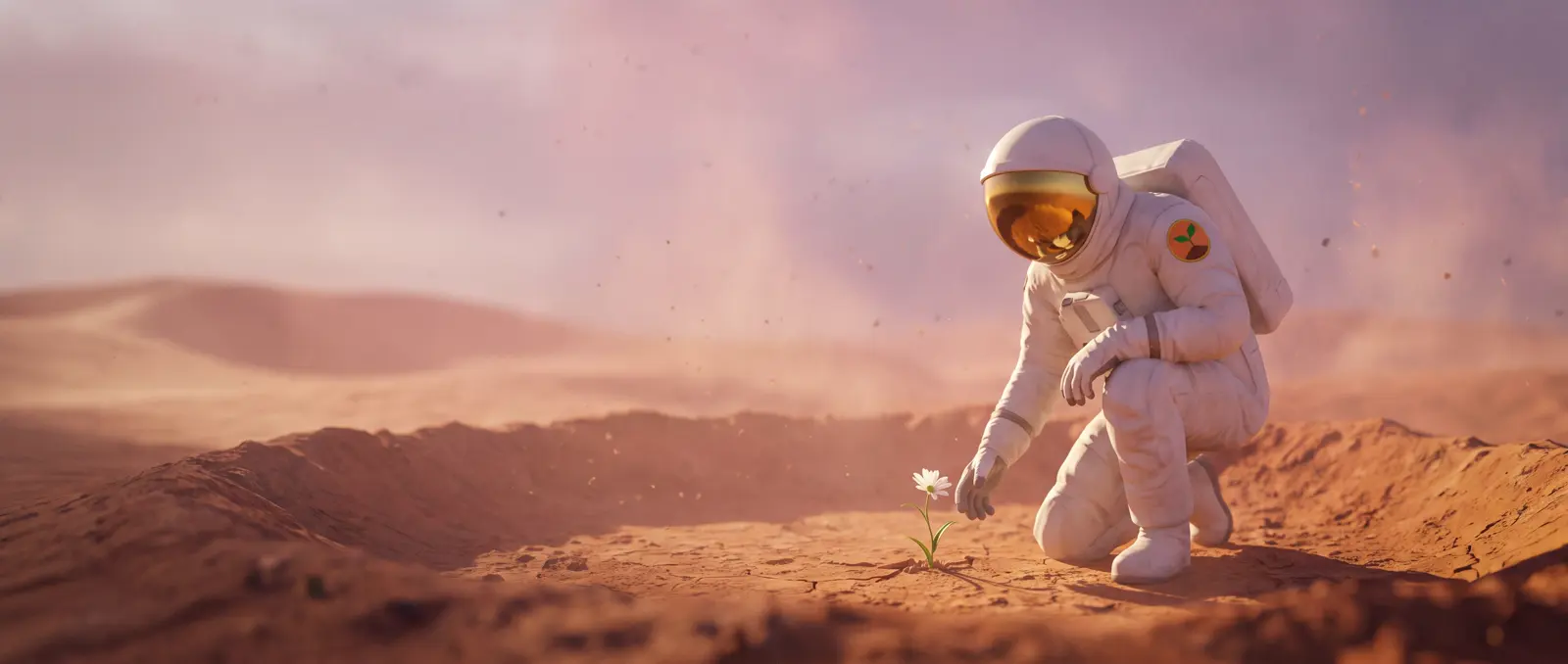
The short answer
Storyboard to video takes three steps: write the shots in a chat app, draw them as one AI storyboard sheet in an image app, then upload the sheet to Seedance 2.5, an AI video model, set the length to 20 seconds and paste one line: "Generate a video that follows the storyboard in @Image1, shot by shot, in order." (@Image1 means the first picture you uploaded.) We tried that same line on two very different boards. A quiet 9-panel sci-fi short came back with all nine shots in order, and a 12-panel rooftop gunfight with all twelve. Neither video copied the board's caption text onto the screen, and both spelled their titles right.
What is a storyboard, and why use one for AI video?
A storyboard is a sheet of small pictures, one per shot, that shows what the camera sees, in what order and for how long. In film it's the plan before anything is shot. In AI video it does a second job: you can hand the sheet to the video model, and it reads the order, the framing and the timing off it.
That's why a board beats a long text prompt for anything with several shots. You see every shot before you pay for video, and the model gets a picture of each one instead of a description. BytePlus, the company behind Seedance, lists storyboards as one of its reference types, for "subjects, composition, actions, plot, and scene progression" (its prompt guide).
Words you'll see on this page
- Panel: one picture on the storyboard, which becomes one shot of the video.
- Shot list: the storyboard written out in words, one line per shot.
- Reference image: a picture you upload for the video model to study and follow.
- First frame: a picture the video starts on. Don't use the storyboard as one.
- @Image1: how Seedance names the first picture you upload.
- Shot size: how close the camera is: wide, medium or close-up.
- Camera move: what the camera does during a shot, such as a push-in, a tracking shot or an orbit.
- 16:9 and 480p: widescreen, and Seedance 2.5's lowest (and cheapest) video quality.
Free AI storyboard template
This is the board for our first test, a 20-second sci-fi short called First Bloom. Copy the layout, not the story.
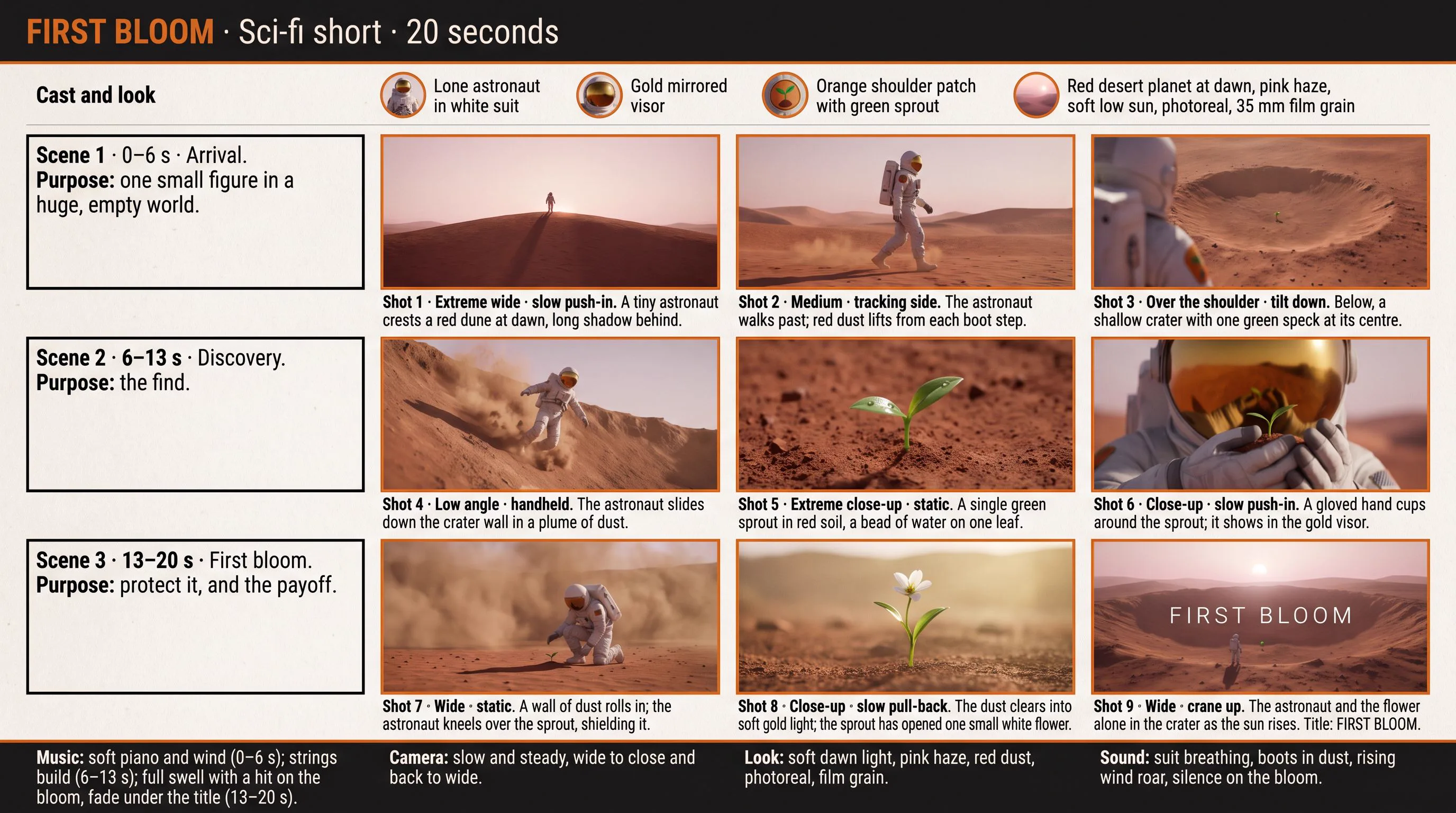
The five parts, and what each one does:
- Title bar: the title, the genre and the length. It tells the model what kind of film this is and how long.
- Cast and look: the main character described once, plus the light and the frame shape (16:9 is widescreen). This is what keeps the character the same in every shot.
- Scene rows: a beginning, a middle and an end, each with its time range and one line on what the scene is for. Both our videos kept to the scene times.
- Panels: one picture per shot, with a caption underneath: the shot number, the shot size (how close the camera is: wide, medium, close-up), the camera move (push-in, tracking, orbit) and one action. Prompt 2 also asks for each shot's time in the corner. The image app left those off, but the videos still played the shots in order.
- Footer: music, camera, look and sound for the whole clip.
Rules of thumb: one panel for every 2–3 seconds (9 for 20 seconds), or every 1–2 seconds for fast action (our gunfight has 12). One action per panel, and no more than 15 panels on one sheet: BytePlus warns that more can freeze frames or mix up the order.
Step 1: the storyboard prompt for ChatGPT, Gemini or Claude
Paste this into ChatGPT, Gemini, Claude or any chat app, and fill in the brackets. It writes a shot list (your storyboard in words) in the format step 2 needs.
You are a film storyboard artist. Turn my idea into a storyboard for a [20]-second AI video.My idea: [who, where, what happens, how it ends, in one or two sentences]Look: [for example photoreal, soft dawn light] · Format: [16:9 or 9:16]Rules:- 3 scenes (beginning, middle, end) with 3 shots each, 9 shots in all.- For every shot: a time range (2–3 seconds; all shots add up to [20] seconds), a shot size (extreme wide, wide, medium, close-up, extreme close-up), one camera move (static, push-in, pull-back, tracking, tilt, crane, handheld) and one sentence with one action.- Give each scene a short title and a one-line purpose.- Describe the main character once, with distinctive details (outfit colours, one unusual feature), and keep them identical in every shot. If they are a realistic person, keep the face hidden (helmet, mask, or from behind).- End with four short lines: Music (per scene), Camera (overall), Look (light, colour, texture), Sound.- No real people, brands, logos or famous characters.Write it like this: a title line (title · genre · length), a "Cast and look" line, then for each scene a line "Scene 1 · 0–6 s · Title. Purpose: …" followed by its shots as "Shot 1 · 0–2 s · Wide · push-in: action.", then the four lines.
For fast action, change the first rule to 4 shots per scene (12 in all, 1–2 seconds each). Read the shot list before you draw it. Every shot should have one action, the times should add up to the length, and the character should be described once and never change.
Step 2: draw the storyboard with Nano Banana or ChatGPT
Copy this prompt into an image app, then paste your shot list from step 1 underneath it. In ChatGPT or Gemini you can stay in the same chat (Gemini's image tool is called Nano Banana). We used Nano Banana Pro in SpeedReel: 18 credits per image (credits are SpeedReel's pay-as-you-go points).
Draw this storyboard as one 16:9 storyboard sheet.Layout: a title bar with the title, genre and length; a thin "Cast and look" strip under it; then one row per scene: on the left the scene number, time range, title and purpose, on the right its shots as equal frames, each with its time range in the top corner and a caption underneath (shot number, shot size · camera move, one-line action); a footer with four boxes: Music, Camera, Look, Sound.Sheet: light off-white paper, dark charcoal text, one accent colour.Frames: [look], the same character design in every frame, clean, uncluttered, captions in plain readable type, no logos.[paste the storyboard from step 1]
The exact prompt we sent for the First Bloom board
Draw this storyboard as one 16:9 storyboard sheet.Layout: a title bar with the title, genre and length; a thin "Cast and look" strip under it; then one row per scene: on the left the scene number, time range, title and purpose, on the right its 3 shots as equal frames, each with its time range in the top corner and a caption underneath (shot number, shot size · camera move, one-line action); a footer with four boxes: Music, Camera, Look, Sound.Sheet: light off-white paper, dark charcoal text, one accent colour.Frames: photoreal, soft dawn light, the same character design in every frame, clean, uncluttered, captions in plain readable type, no logos.FIRST BLOOM · Sci-fi short · 20 seconds · 3 scenes × 3 shotsCast and look: a lone astronaut in a white suit, gold mirrored visor, orange circular shoulder patch with a green sprout. Red desert planet at dawn, pink haze, soft low sun, photoreal, 35 mm film grain. 16:9.Scene 1 · 0–6 s · Arrival. Purpose: one small figure in a huge, empty world.Shot 1 · 0–2 s · Extreme wide · slow push-in: A tiny astronaut crests a red dune at dawn, long shadow behind.Shot 2 · 2–4 s · Medium · tracking side: The astronaut walks past; red dust lifts from each boot step.Shot 3 · 4–6 s · Over the shoulder · tilt down: Below, a shallow crater with one green speck at its centre.Scene 2 · 6–13 s · Discovery. Purpose: the find.Shot 4 · 6–8 s · Low angle · handheld: The astronaut slides down the crater wall in a plume of dust.Shot 5 · 8–10 s · Extreme close-up · static: A single green sprout in red soil, a bead of water on one leaf.Shot 6 · 10–13 s · Close-up · slow push-in: A gloved hand cups around the sprout; it shows in the gold visor.Scene 3 · 13–20 s · First bloom. Purpose: protect it, and the payoff.Shot 7 · 13–15 s · Wide · static: A wall of dust rolls in; the astronaut kneels over the sprout, shielding it.Shot 8 · 15–17 s · Close-up · slow pull-back: The dust clears into soft gold light; the sprout has opened one small white flower.Shot 9 · 17–20 s · Wide · crane up: The astronaut and the flower alone in the crater as the sun rises. Title: FIRST BLOOM.Music: soft piano and wind (0–6 s); strings build (6–13 s); full swell with a hit on the bloom, fade under the title (13–20 s).Camera: slow and steady, wide to close and back to wide.Look: soft dawn light, pink haze, red dust, photoreal, film grain.Sound: suit breathing, boots in dust, rising wind roar, silence on the bloom.
Check the sheet before you go on: spelling, logos and flags, and whether each panel follows from the one before. The video copies the board, mistakes included (more on that below).
Step 3: storyboard to video in Seedance 2.5, with one prompt
Open Seedance 2.5 in a video app that offers it. We used SpeedReel.
Upload the storyboard sheet as a reference image (a picture the model studies for guidance), not as the first frame (the picture the video starts on). As a first frame, the video would open on the sheet itself.
Set the length, the shape and the resolution: we used 20 seconds, 16:9 (widescreen) and 480p (the lowest and cheapest quality).
Paste this line into the prompt box and generate:
Generate a video that follows the storyboard in @Image1, shot by shot, in order.
Why this wording:
- "in @Image1" tells the model which upload is the storyboard. That matters once you attach more pictures, such as a character sheet or a location.
- "shot by shot, in order" tells the model to play the panels in sequence, which a picture alone can't guarantee.
- No "8K", no "for 20s": length and resolution are settings, not words. Seedance 2.5 makes 480p, 720p or 1080p. Our clips cost 247 credits each at 480p; the same clip at 1080p is priced at 1,365.
- No style words: the board already shows the look.
You'll often see a longer version shared: "please generate video follow the storyboard, soft light cinematic, photorealistic, 8K resolution. for 20s". We ran the First Bloom board with that one too. It also played all nine shots in order and added the same US flag (see example 1). The extra words didn't change what came out; the board did the work.
Example 1
First Bloom: a 9-panel sci-fi storyboard
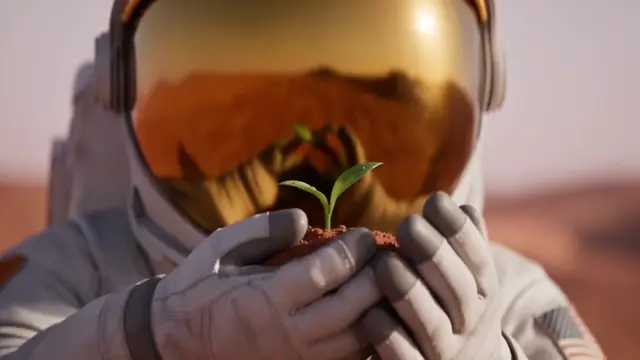
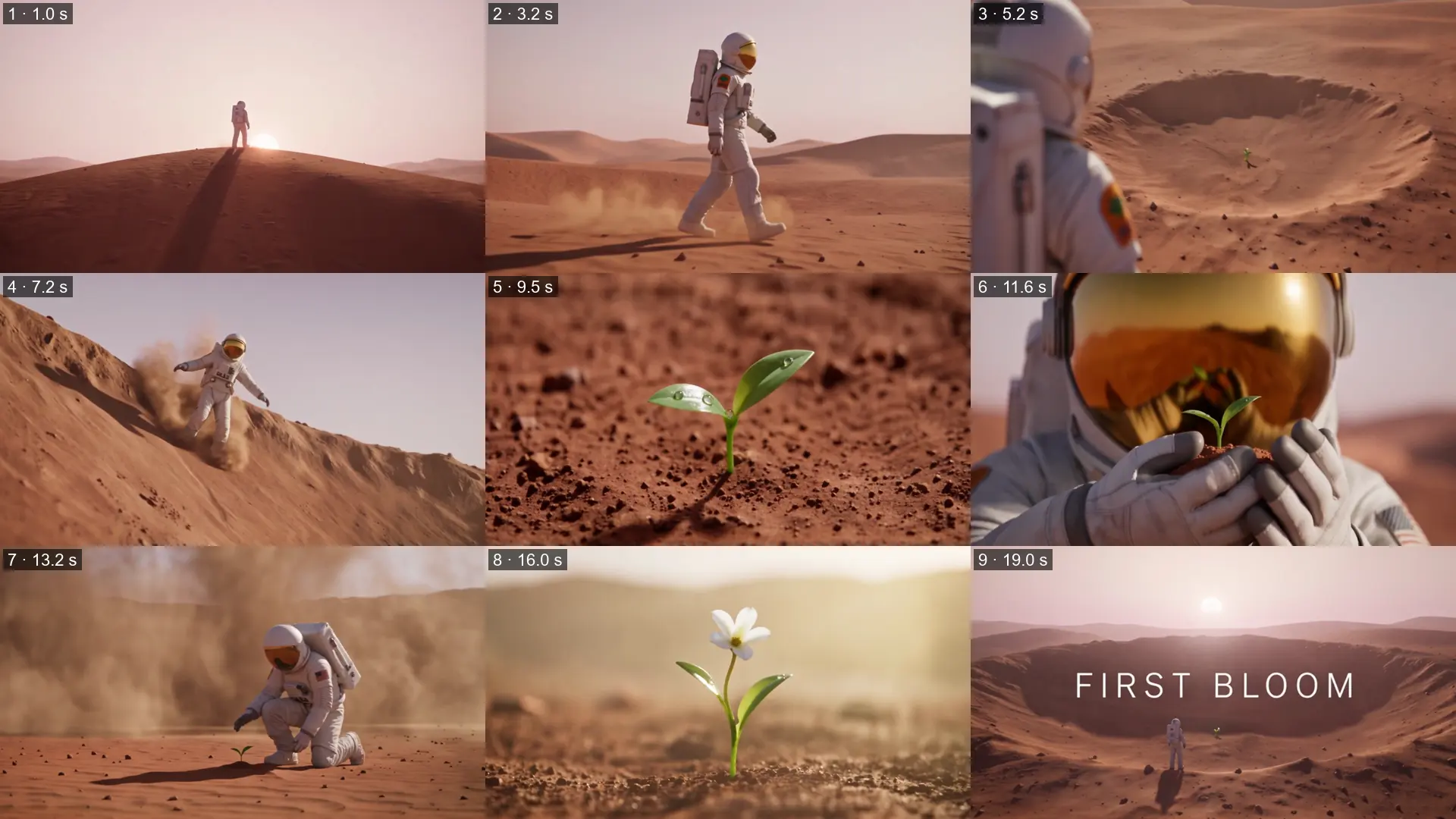
What came out:
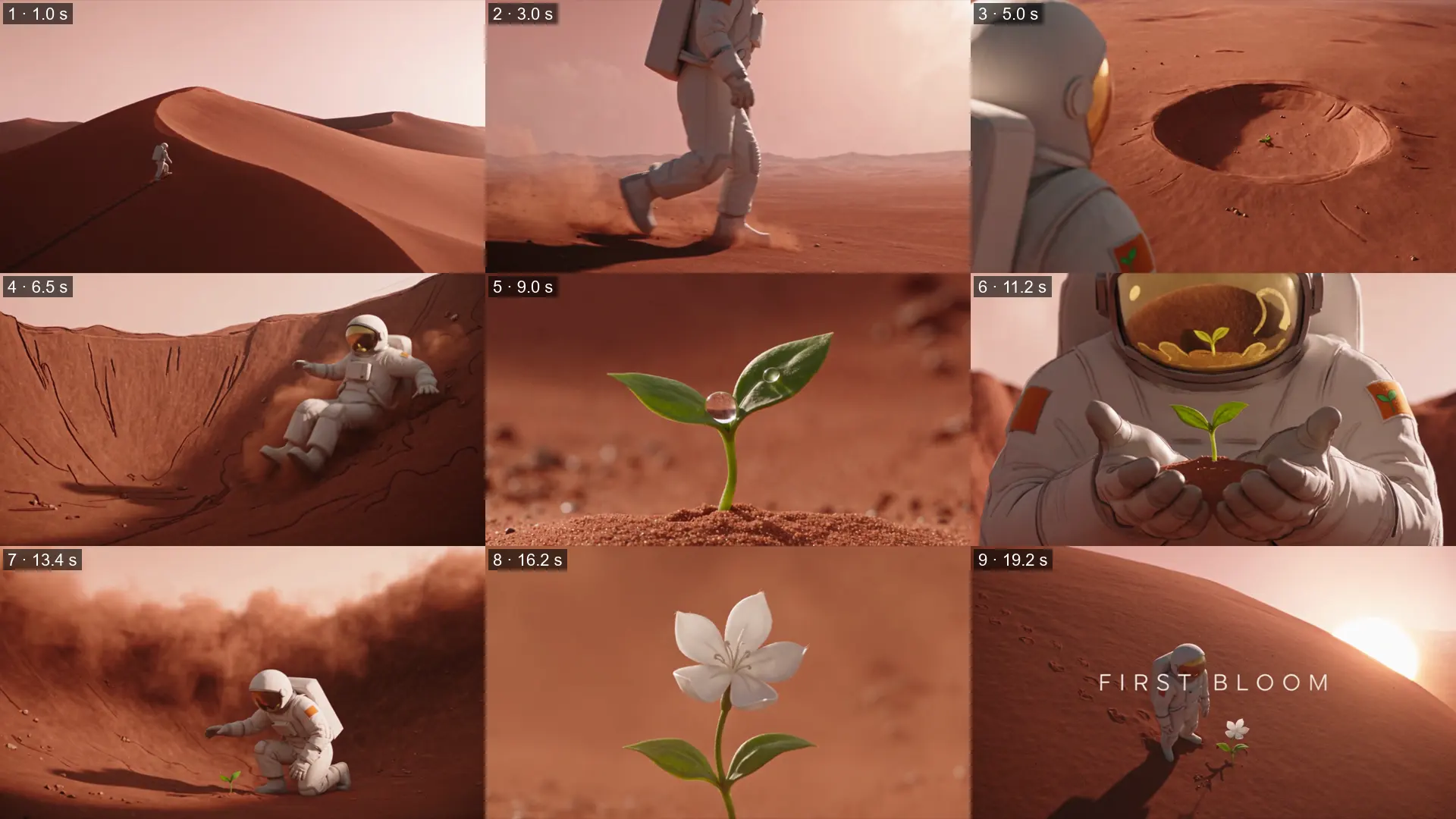
- All nine shots, in order, each starting within about half a second of its time in the shot list. The prompt has no times; the board shows each scene's time range, and the model split it across the shots.
- The slow push-in on shot 1 shows, and the dust storm swallows the frame before the bloom.
- No board text on screen. The only text in the video is the title the board asked for, FIRST BLOOM, spelled right.
- It copied the board's mistake. In shot 6 the astronaut holds the sprout in a clump of soil, as on the board, and in shot 7 it's back in the ground.
- It added a real flag. In shot 7 a US flag appears on the arm where the board has a plain orange patch, in both videos we made from this board. The model drifts toward the best-known version of things: a spacesuit gets a flag, the way sneakers get famous logos.
Example 2
Hard Reset: a 12-panel action storyboard
Same template, same one-line prompt, a very different job: two masked fighters, Kestrel and the Warden, go from rifles to pistols to fists on a rainy rooftop, with bullet time (super slow motion while the camera moves around the action), a cartwheel through gunfire and a kick that shatters a mask. Both wear full masks, because Seedance refuses reference images that look like real people.
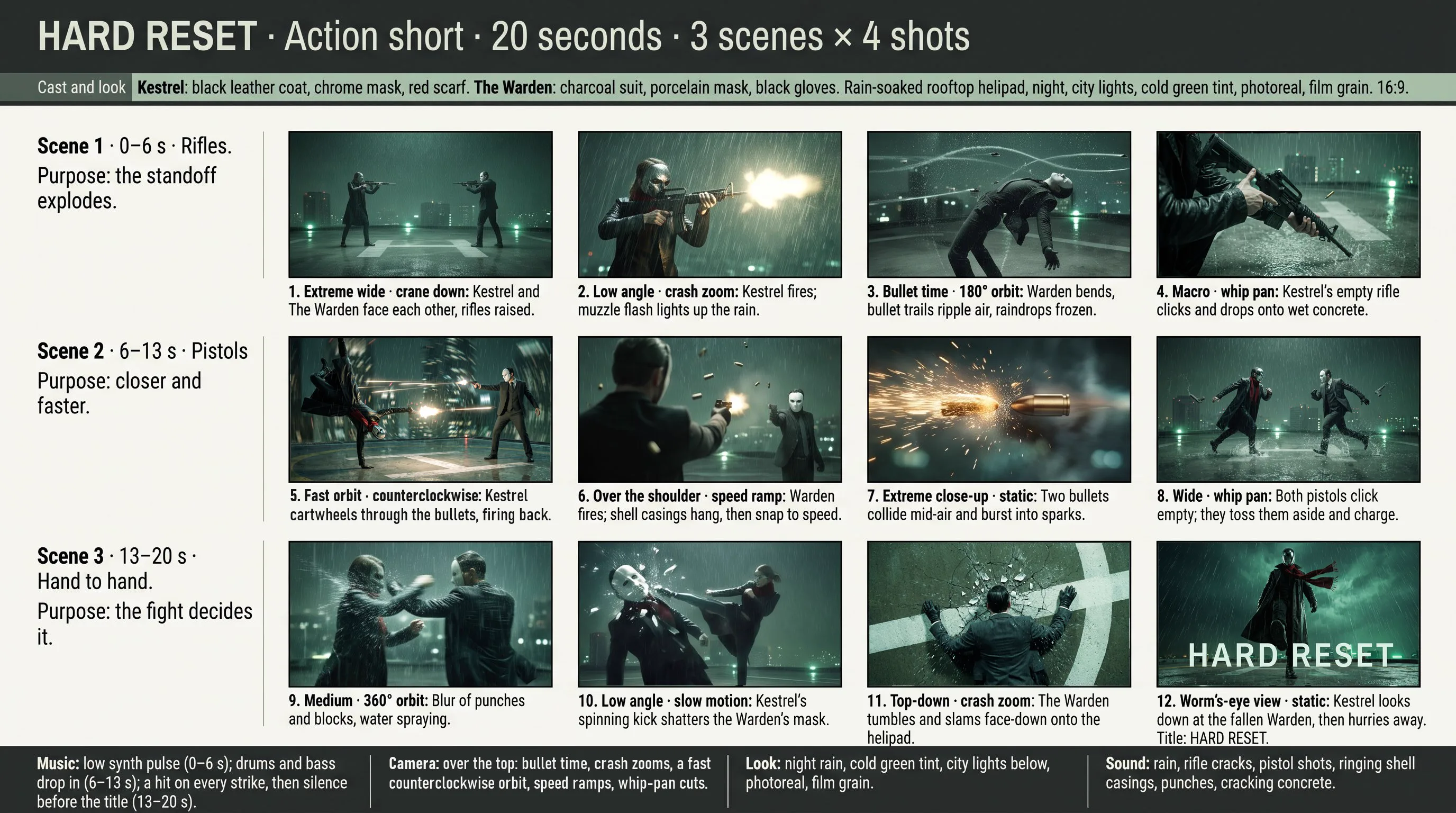
The storyboard prompt, with the final shot list
Draw this storyboard as one 16:9 storyboard sheet.Layout: a title bar with the title, genre and length; a thin "Cast and look" strip under it; then one row per scene: on the left the scene number, time range, title and purpose, on the right its shots as equal frames, each with its time range in the top corner and a caption underneath (shot number, shot size · camera move, one-line action); a footer with four boxes: Music, Camera, Look, Sound.Sheet: light off-white paper, dark charcoal text, one accent colour.Frames: photoreal, night rain, cold green tint, the same character designs in every frame, clean, uncluttered, captions in plain readable type, no logos.HARD RESET · Action short · 20 seconds · 3 scenes × 4 shotsCast and look: Kestrel, a fighter in a long black leather coat, a smooth mirrored chrome full-face mask and a red scarf. The Warden, a tall fighter in a charcoal three-piece suit, a white porcelain full-face mask with a thin black eye slit, and black gloves. A rain-soaked rooftop helipad of a glass skyscraper at night, city lights far below, cold green-tinted night, photoreal, film grain. 16:9.Scene 1 · 0–6 s · Rifles. Purpose: the standoff explodes.Shot 1 · 0–2 s · Extreme wide · crane down: Kestrel and the Warden face each other across the rain-soaked helipad, rifles raised.Shot 2 · 2–3 s · Low angle · crash zoom: Kestrel fires; the muzzle flash lights up the rain.Shot 3 · 3–5 s · Bullet time · 180° orbit: The Warden bends backward as bullet trails ripple the air above him, raindrops frozen.Shot 4 · 5–6 s · Macro · whip pan: Kestrel's empty rifle clicks and drops onto the wet concrete.Scene 2 · 6–13 s · Pistols. Purpose: closer and faster.Shot 5 · 6–8 s · Fast orbit · counterclockwise: Kestrel cartwheels through the Warden's bullets, firing back.Shot 6 · 8–10 s · Over the shoulder · speed ramp: The Warden fires back; shell casings hang in slow motion, then snap to full speed.Shot 7 · 10–11 s · Extreme close-up · static: Two bullets collide in mid-air and burst into sparks.Shot 8 · 11–13 s · Wide · whip pan: Both pistols click empty; they toss them aside and charge at each other.Scene 3 · 13–20 s · Hand to hand. Purpose: the fight decides it.Shot 9 · 13–15 s · Medium · 360° orbit: A blur of punches and blocks in the rain, water spraying off their sleeves.Shot 10 · 15–17 s · Low angle · slow motion: Kestrel's spinning kick shatters the Warden's mask.Shot 11 · 17–18 s · Top-down · crash zoom: The Warden tumbles and slams face-down onto the helipad; the wet concrete cracks.Shot 12 · 18–20 s · Worm's-eye view · static: Kestrel looks down at the fallen Warden, then hurries away. Title: HARD RESET.Music: low synth pulse (0–6 s); drums and bass drop in (6–13 s); a hit on every strike, then silence before the title (13–20 s).Camera: over the top: bullet time, crash zooms, a fast counterclockwise orbit, speed ramps, whip-pan cuts.Look: night rain, cold green tint, city lights below, photoreal, film grain.Sound: rain, rifle cracks, pistol shots, ringing shell casings, punches, cracking concrete.
Fixing the board took longer than making the clip. Our first attempt got six panels wrong: a wooden rifle where the black one should be, Kestrel firing two ways at one opponent, pistols still raised when they should be thrown away, the Warden face-up with a realistic face, and a plain last shot. Asking the image app to edit the whole sheet garbled its captions ("crash soom"), so we redrew each bad panel on its own and pasted it over the old one.
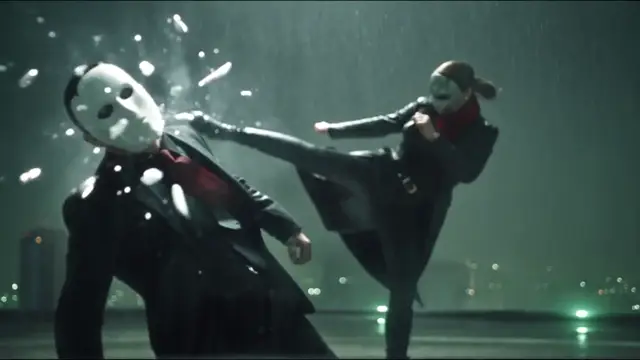
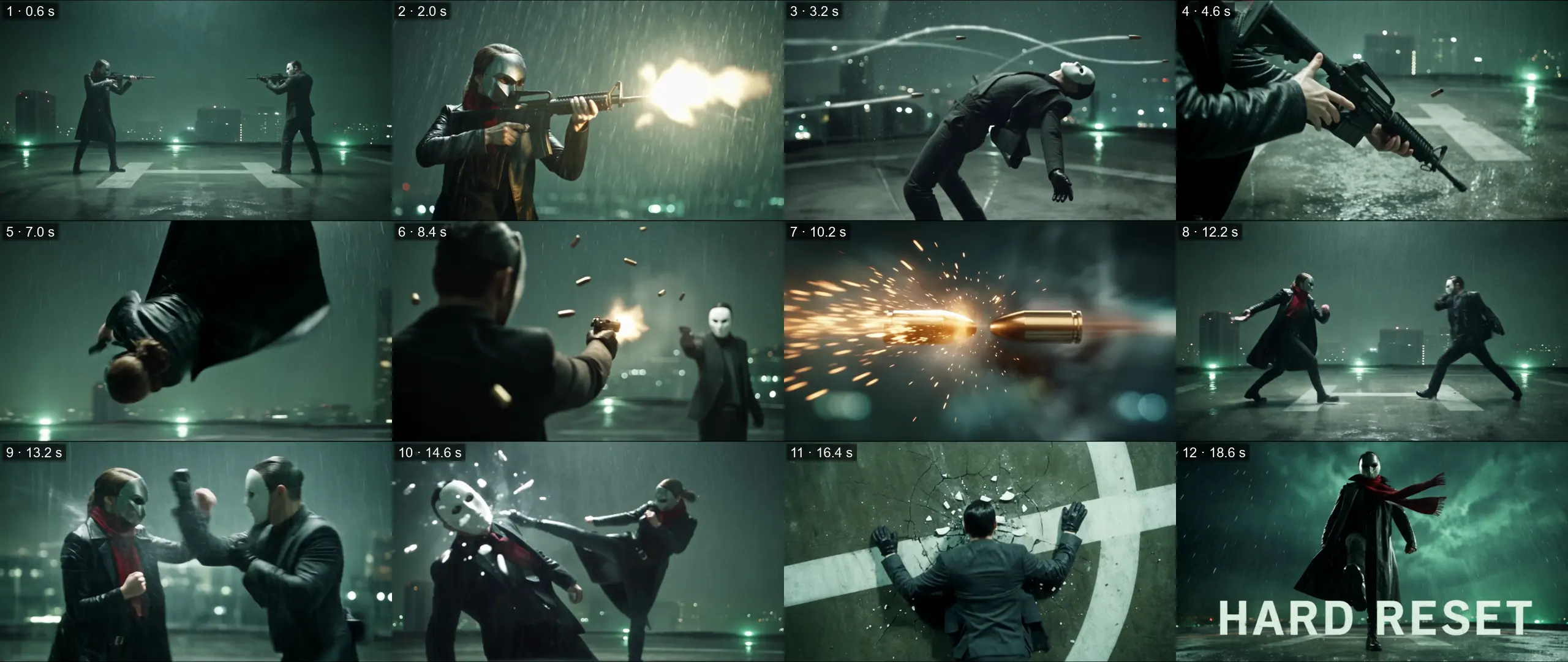
What came out:
- All twelve shots, in order. Each scene change landed within about a quarter of a second of the board's scene times, at 6 and 13 seconds.
- The big moments made it in: the slow-motion lean-back, the rifle dropping into the rain, two bullets colliding in sparks, the kick cracking the mask, the concrete cracking under the Warden, and the HARD RESET title, spelled right.
- One shot played twice. The cartwheel through the gunfire (panel 5) came back for a moment between shots 7 and 8.
- The camera moves were tamer than the board. The crash zooms (sudden fast zooms) and the 360° orbit (the camera circling the fighters) came out as quick cuts and freeze frames. The clearest move is the picture spinning with the cartwheel.
- The final moment is missing: Kestrel stands over the camera but doesn't hurry away.
- The masks stayed on. The kick cracks the Warden's mask and throws off shards, but no face ever shows.
Fix the storyboard before you make the video
The video follows the board closely, so a mistake on the board becomes a mistake in the clip. Check these first:
- One action per panel, and times that add up to the clip's length.
- Each panel follows from the one before. Our First Bloom board had the sprout dug up in shot 6 and back in the ground in shot 7, and so did both videos.
- The action makes sense: who shoots at whom, which way, and with what. Our gunfight board first had Kestrel firing left and right at a single opponent.
- The same character and props in every panel, and no misspelled words.
- No logos or flags. Zoom in on clothes and props: AI tends to add famous logos and flags to suits, sneakers and gadgets.
- No realistic faces. Seedance refuses reference images that look like real people, AI-made ones included. A helmet, a mask, a back view, an animal or a stylized character all work; the consistency guide shows what works for realistic people.
- Fix one bad panel by redrawing just that panel. Ask the image app for that one frame on its own, then paste it over the old one in any photo editor. Editing the whole sheet can garble its captions.
Need every panel exactly? BytePlus's answer is keyframes (pictures the video must match at set points): upload each panel as its own image and start the prompt with "Use Images 1 to 9 in order as keyframes." We haven't tested that yet.
Questions
AI storyboards: FAQ
Can ChatGPT make a storyboard?
Yes. ChatGPT, Gemini, Claude or any chat app can write the shot list with prompt 1 on this page, and ChatGPT and Gemini can also draw the sheet in the same chat with prompt 2. Read the shot list before you draw it: one action per shot, times that add up, the same character throughout.
Can AI turn a storyboard into a video?
Yes. Attach the storyboard to a video model that takes reference images, such as Seedance 2.5, and ask it to follow the board. We made two 20-second clips this way, a 9-panel sci-fi short and a 12-panel gunfight, and every shot played in order.
Can Seedance 2.5 follow a storyboard?
Yes. BytePlus lists storyboards as one of Seedance 2.5's reference types and recommends 15 panels or fewer. Both our boards worked as a single reference image with a one-line prompt: 9 panels and 12 panels, every shot in order.
What should I write in the prompt with a storyboard?
One line is enough: "Generate a video that follows the storyboard in @Image1, shot by shot, in order." Set the length and resolution in the app; words like "8K" or "for 20s" in the prompt don't change them.
How many panels should an AI storyboard have?
About one for every 2–3 seconds, or 1–2 seconds for fast action: 9 panels for our 20-second short, 12 for our 20-second gunfight. BytePlus, which makes Seedance, recommends 15 or fewer; more can freeze frames or mix up the order.
Will the video follow every panel exactly?
Not guaranteed. BytePlus calls a multi-panel board a rough guide to the story, not an exact shot-by-shot plan. Ours played every panel in order but changed small details: both copied their board's mistakes, one added a flag, and the gunfight played one shot twice. For an exact match, BytePlus suggests uploading each panel as its own image and using them as keyframes.
Why did my storyboard's lines or text show up in the video?
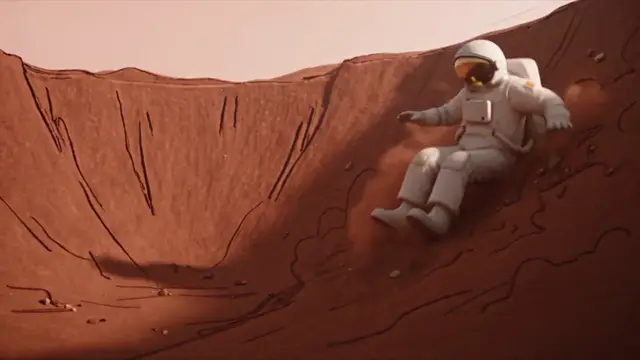
The model can copy what the sheet looks like, not just what it shows. In our tests, finished-looking full-colour boards kept their captions off the screen, but a pencil-sketch (line-art) board's lines leaked onto the ground and the suit. Draw the board to look like the finished video.
Do I need an AI storyboard generator?
No. The two prompts on this page work in the chat and image apps you already use. A dedicated storyboard tool can help with longer projects, but one sheet for one clip needs only these prompts.
How long can a storyboard video be?
Seedance 2.5 makes 4 to 30 seconds per clip. For longer videos, make one storyboard per clip and edit the clips together.
Appendix
Finished storyboard or line art? We tested the official advice
BytePlus's own guide recommends the opposite of our boards: simple line-art or stick-figure boards, no text on the sheet, and a full prompt that spells out every shot. It lists busy, AI-made boards like ours as "not recommended". So we drew First Bloom's nine shots as line art (plain pencil outlines, where our boards are finished, full-colour pictures) and wrote the full prompt.
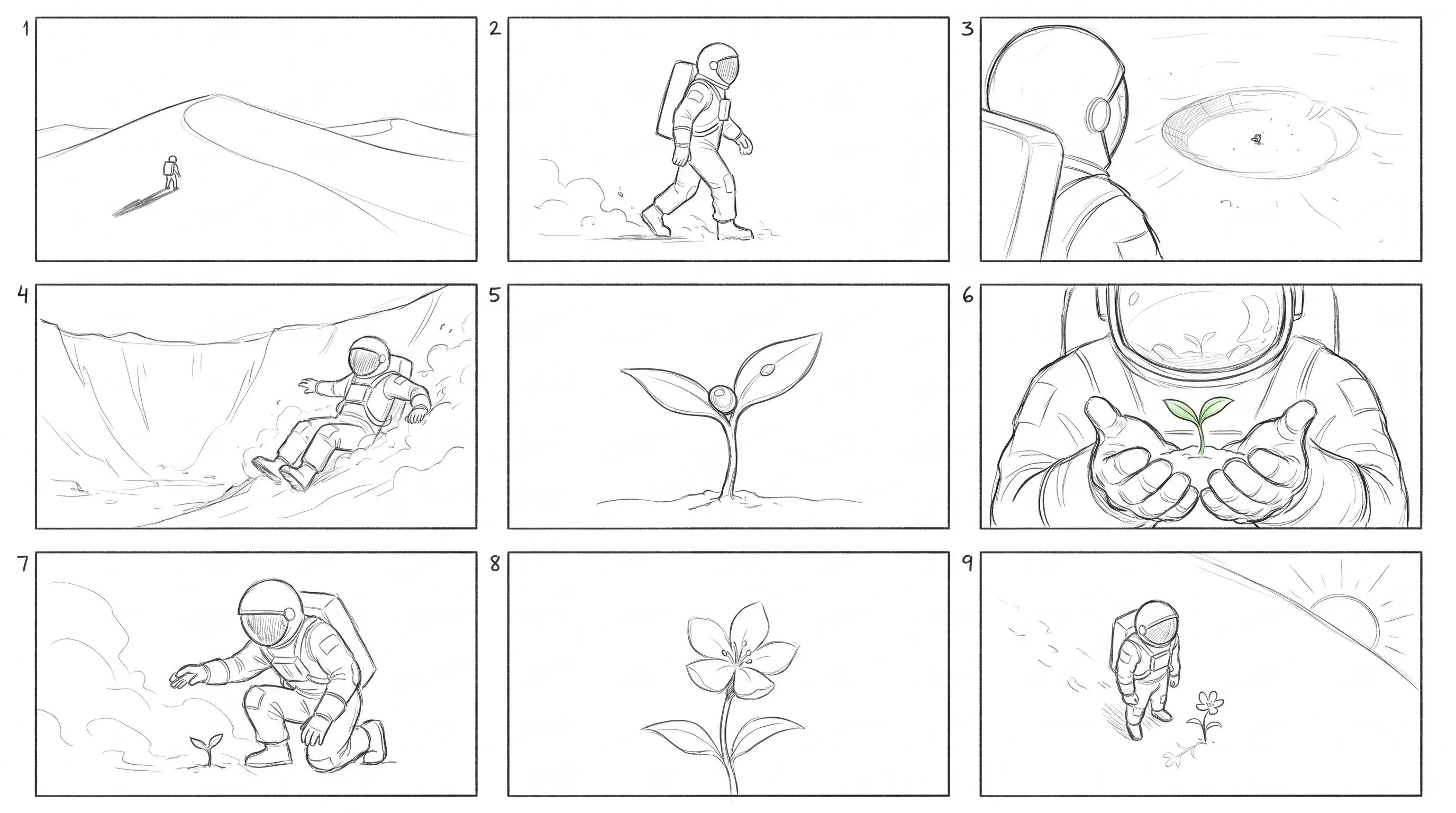
The prompt that redrew it (with the First Bloom board attached)
Redraw the 9 shots of this storyboard as simple black-and-white line-art sketches: a 3×3 grid of 16:9 frames on a plain white page, read left to right, top to bottom, keeping each frame's composition. Loose pencil lines, no shading, no colour. Each frame has only a small number (1–9) in its top-left corner. No other text: no title, captions, timecodes, labels or footer.
@Image1 is the storyboard: follow its 9 shots in order, with their shot sizes and camera moves. Each shot is full-screen, photoreal live-action footage.A lone astronaut finds a green sprout in a crater on a red desert planet at dawn, shields it from a dust storm, and it blooms into a small white flower.0–2 s: Extreme wide shot, slow push-in. A tiny astronaut in a white suit with a gold mirrored visor crests a red dune at dawn, a long shadow behind.2–4 s: Medium shot, tracking side. The astronaut walks past, red dust lifting from each boot step, an orange circular patch with a green sprout on the shoulder.4–6 s: Over-the-shoulder shot, tilting down. Below, a shallow crater with one green speck at its centre.6–8 s: Low angle, handheld. The astronaut slides down the crater wall in a plume of red dust.8–10 s: Extreme close-up, static. A single green sprout in red soil, a bead of water on one leaf.10–13 s: Close-up, slow push-in. A white-gloved hand cups around the sprout; the sprout shows in the gold visor.13–15 s: Wide shot, static. A wall of dust rolls in; the astronaut kneels over the sprout, shielding it with their body.15–17 s: Close-up, slow pull-back. The dust clears into soft gold light; the sprout has opened one small white flower.17–20 s: Wide shot, crane up. The astronaut and the flower alone in the crater as the sun rises. The title "FIRST BLOOM" fades in at the centre in thin white letters.Look: soft dawn light, pink haze, red dust, photoreal, 35 mm film grain, the same white suit, gold visor and orange patch in every shot.Sound: suit breathing and boots in dust over soft piano and wind, strings building, a rising wind roar, silence on the bloom, then a soft swell under the title.
| Finished board + one line (2 videos) | Line art + full prompt | |
|---|---|---|
| Shots in order | 9 of 9, both videos | 9 of 9 |
| Timing | Within about 0.5 s of the shot list | Within about 0.5 s of the prompt |
| Text on screen | Only the title the board asked for | Only the title the prompt asked for |
| Look | Photoreal, like the board | Pencil outlines on the ground, suit and gloves; half cartoon |
| Shoulder patch | Plain, but a US flag in shot 7, both videos | Plain orange, as the prompt said |
| Framing | As drawn | Shot 2 on the legs; the last shot on a dune, not in the crater |
| What you write | One line | About 15 lines |
Our advice: start with a finished-looking board in the look you want. It carries the light, the colours and the framing as well as the order, and in our tests its text stayed off the screen. Line art kept the order just as well, but the model copied the drawing style too. BytePlus's own example adds a list of things to leave out (sketches, line art, storyboard frames), which we didn't test here. We made only one line-art video, so treat it as what can happen, not what always happens.
Where to go next
- How to keep characters consistent in AI video: when one storyboard isn't enough and the character has to last.
- How to make AI videos with Seedance 2.5: what it costs, where to use it, and why videos miss the prompt.
- More templates: music video · product video · AI series.
- Generate in SpeedReel ↗
How we tested: all clips were made with Seedance 2.5 in SpeedReel on November 6, 2026: 20 seconds, 480p, 16:9, with sound, the storyboard attached as a reference image, one try each, unedited. Each clip cost 247 credits. The boards were made with Nano Banana Pro in SpeedReel at 18 credits an image; the gunfight board took 15 images, counting its redrawn panels. The storyboard text was written to the rules in prompt 1. PromptJazz makes its clips in SpeedReel, a friendly partner (About).